
5. Mix Settings
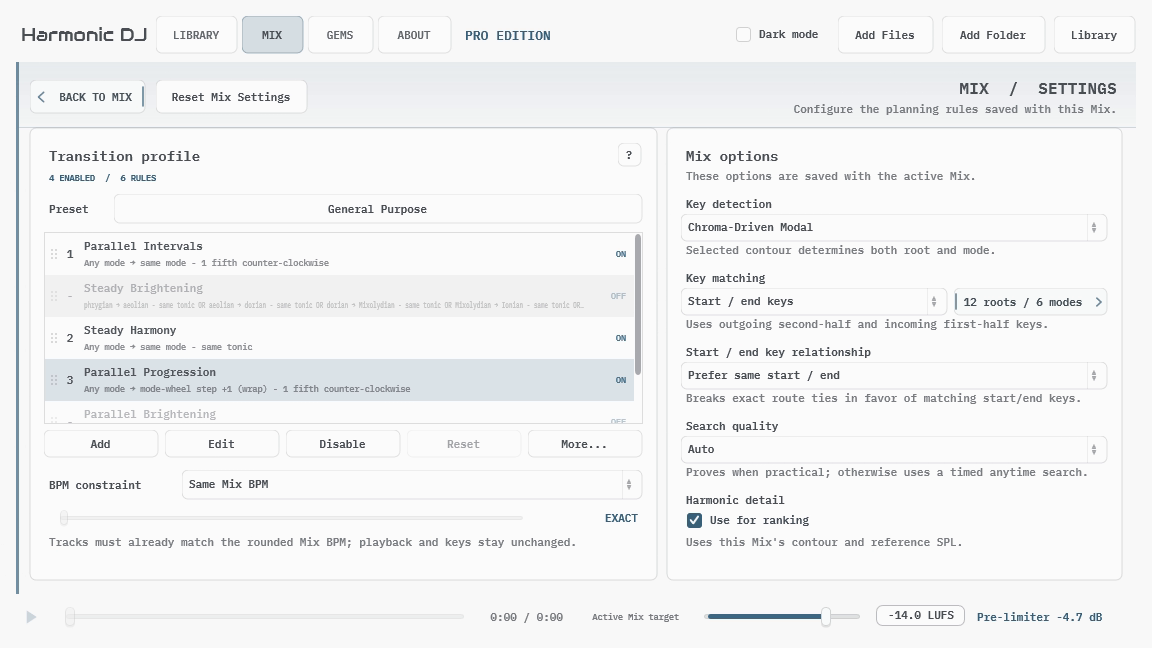
Mix Settings contains the planning rules saved with the active Mix. It is separate from the application-wide Config workspace, which controls theme and interface size. The example above uses Chroma-Driven Modal; detector choice belongs to the Mix, so another Mix can still use Benchmark-Guided Modal. Reset Mix Settings returns the whole page to the release defaults: Benchmark-Guided Modal detection, ECMA-418, the General Purpose transition preset, start/end matching, a preference for stable tracks, Same Mix BPM, Auto search quality, and harmonic-detail ranking.
Mix Settings Presets… opens the preset browser for complete planning setups. Save profiles for different situations, select one, and choose Apply Settings to copy it into the active Mix. Your candidate selection and tracklist stay with that Mix.
Change one idea at a time and listen to complete Mixes. A focused transition preset is much easier to understand when the other constraints remain steady.