1. Introduction
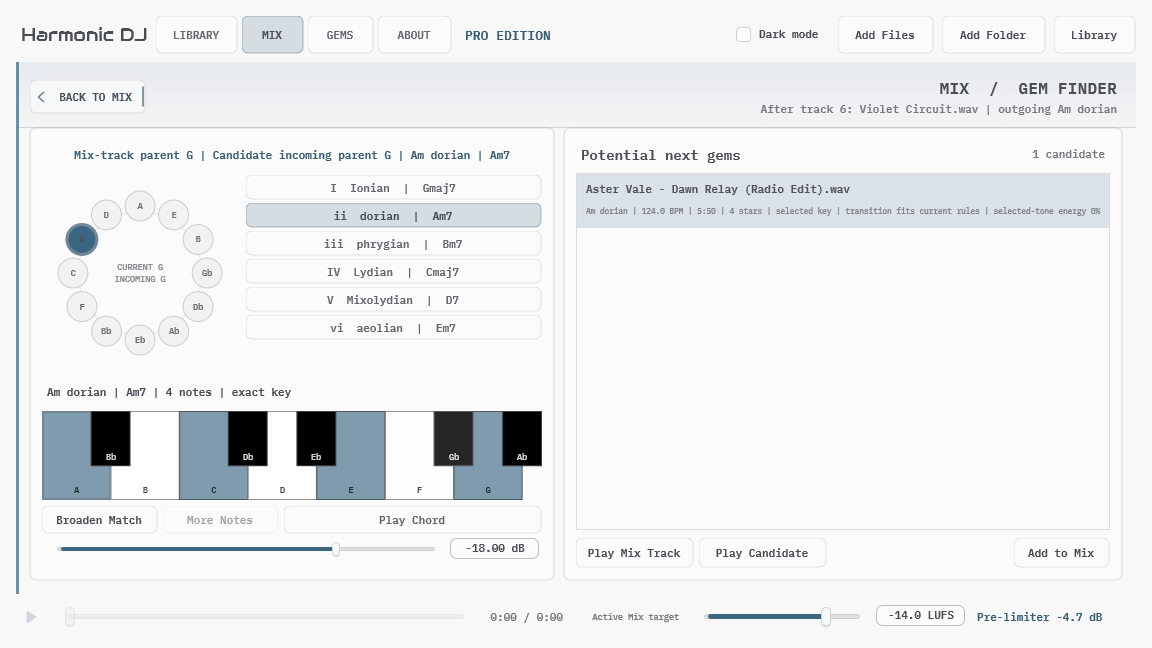
APU Harmonic DJ analyzes a local music library and helps turn it into directed transitions and complete tracklists. It combines key and BPM detection with modal relationships, full harmonic evidence, gain guidance, and the transitions you personally save as Gems.
The basic workflow is simple: add music to the Library, create or generate a Mix, audition the transitions that matter, and save the strongest directed pairings as Gems. Harmonic DJ can do the routine searching while leaving the final musical decision where it belongs: with the listener.
Harmonic DJ is local-first. Audio analysis and audition happen on your computer. Shared collections contain path-free metadata and analysis rather than commercial audio, and a Mix document does not contain the audio files referenced by its tracklist.
Start with Getting Started for a first tracklist using the release defaults. The later sections explain how to refine a Mix, use Gem Finder, create custom transition profiles, and exchange metadata with another Harmonic DJ user.
2. Getting Started
A first useful result does not require any theory or custom configuration. Add a representative folder, let its tracks finish analyzing, and generate a Mix with the defaults. This gives us something musical to react to before changing the rules.
2.1. Install and Launch
Install Harmonic DJ using the package for your platform. The application and plug-ins are one matched installation and must use the same Harmonic DJ version.
- macOS includes the universal standalone application, VST3, Audio Unit, and AAX.
- Windows includes the standalone application, VST3, and AAX in both x64 and x86 packages.
- Linux x64 includes the standalone application and VST3. Linux plug-in host qualification is deferred; the current release-validation focus is macOS and Windows.
Keep the standalone application installed even if you primarily use a plug-in. It is a required installer component because it owns the shared Library database, scanning, and analysis work used by every plug-in instance. A host may scan the plug-in without opening the application; opening a plug-in editor connects to the Library and can start the application with its window hidden when necessary. Choose Manage in App to show that same application process for Library changes.
The application starts in Community unless a Pro trial or paid license is active. Community does not require an account or activation. Open About when you want to start a Pro trial or activate an existing license. Visit the APU Harmonic DJ product page to see current Pro pricing or purchase Pro.
On Windows N and KN editions, Harmonic DJ requires the Microsoft Media Feature Pack. The installer checks for the underlying Media Foundation components and can open Windows Optional Features when they are missing.
2.2. Use Harmonic DJ in a DAW
Add Harmonic DJ as an effect on a stereo audio track. The plug-in passes the host track through while its preview player is idle. Opening the editor connects it to the Library owned by the installed Harmonic DJ application; scanning or restoring a project without opening the editor does not need to show the application.
Each plug-in instance owns an independent Mix saved inside the DAW project. Closing and reopening the editor keeps that Mix alive, and reopening the DAW project restores its current revision. A plug-in Mix is not a live reference to whichever named Mix is open in the standalone application. Several instances can use the same shared Library while keeping their Mixes independent.
Library management remains in the application. Use Manage in App when you need to add, remove, rescan, or organize tracks. Library changes then become visible to connected plug-ins. If the application stops while a plug-in is open, the plug-in reconnects after the application returns. A version-mismatch message means the application and plug-ins came from different releases; update or reinstall the complete Harmonic DJ package together.
Preview plays through the plug-in’s host output. Local tracks can be dragged from Harmonic DJ into a host arrangement.
When Host BPM is enabled and the host supplies tempo, Harmonic DJ uses that value for Mix planning and audition rate in the current instance. It falls back to the Mix BPM when host tempo is unavailable. Host BPM does not add a beat grid, quantized start, downbeat detection, phrase alignment, or time stretching.
2.3. Appearance and Interface Size
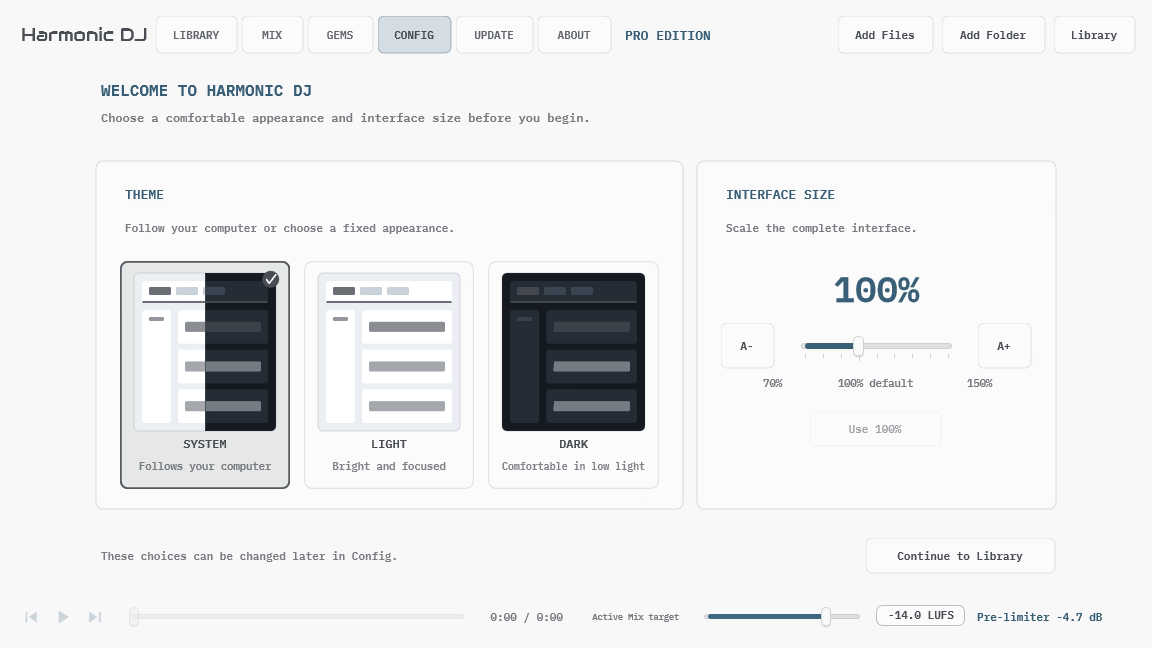
On first launch, Harmonic DJ opens a one-time appearance setup before the Library. Choose an appearance and a comfortable interface size, then select Continue to Library. You can change both choices later in Config. If an earlier Harmonic DJ version already saved a Light or Dark preference, setup selects that preference automatically so continuing performs the migration without changing how the application looks.
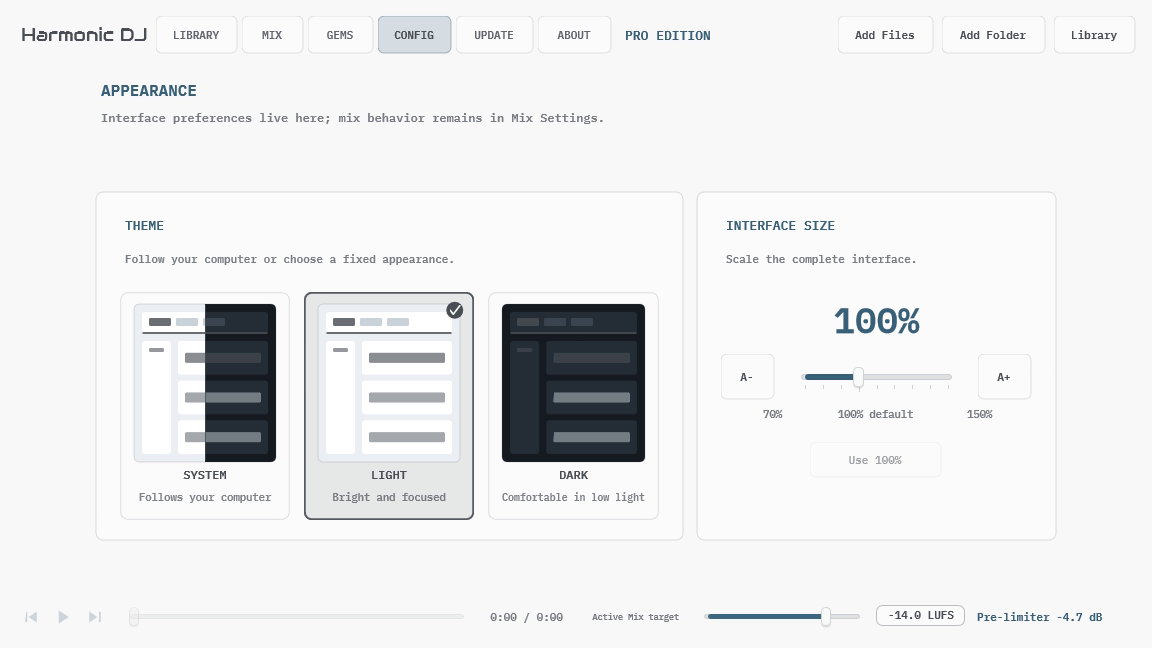
Open Config, immediately to the left of About, for application-wide appearance settings. Config is separate from Mix Settings: changing the theme or interface size affects the application, while Mix Settings contains the musical planning rules saved with one Mix.
Choose System to follow the operating system’s current light or dark appearance. Harmonic DJ updates while it is open when the system setting changes. Choose Light or Dark for a fixed appearance that does not follow the operating system. The selection is saved globally and restored the next time Harmonic DJ opens.
Interface Size scales the complete application from 70% to 150% in 10% steps, preserving the layout instead of enlarging individual labels. Use A-, A+, the slider, or Use 100% to restore the original size. While you drag the slider, the percentage preview follows the selected value; Harmonic DJ resizes once when you release it.
2.4. Create Your First Library
- Open the Library workspace.
- Choose Add Folder and select a folder containing music, or use Add Files for a smaller first pass.
- Leave Harmonic DJ open while it discovers and analyzes the supported files.
- Use the Ready to mix filter when you only want to see tracks with completed key and BPM analysis.
- Select a track and use the playback control to audition it.
Analysis can run across several tracks at once. The Library remains usable while work continues, and completed results survive cancellation. If a scan is interrupted, Harmonic DJ resumes the durable queue the next time the application opens.
A few dozen stylistically related tracks within a compatible BPM range are enough to learn the default workflow. Tracks spread across unrelated tempo ranges may not form a complete route with the default General Purpose profile and Same Mix BPM rule. Use Gem Finder to investigate individual pairs, or add more tracks near the BPM range you want to mix.
2.5. Create Your First Mix
- Open Mix.
- Leave Source on All Groups, or choose the Library groups that should supply candidates. Library browsing filters do not change this selection.
- Leave Tracks at five and BPM on Auto.
- Open Settings within Mix and confirm the release defaults: Benchmark-Guided Modal, Start / end keys, Prefer same start / end, General Purpose, Same Mix BPM, Auto search quality, and harmonic detail enabled.
- Return to the tracklist and choose Generate Tracklist.
- Audition the result. Lock anything you want to keep, replace an alternative, or exclude a poor fit, then generate again.
See Building a Tracklist for reusable group and imported-playlist workflows.
Community uses the same named, auto-saved Mix workflow as Pro, with exact track counts from one through five. Pro adds larger Mixes, Gem Finder, and saved Gems.
The generated route is a starting point, not a claim that every transition is ready to perform unchanged. Rhythm, phrasing, energy, cue points, and transition treatment still need musical judgment.
3. Library
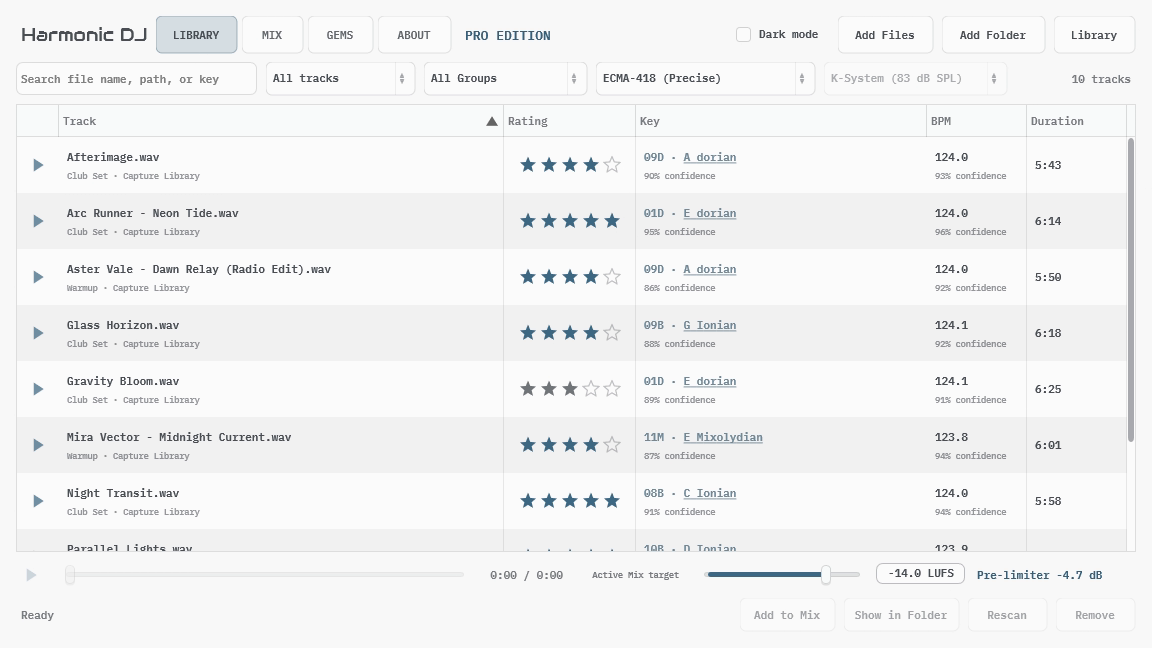
The Library is the analyzed source collection used by Mix, Gem Finder, and saved Gems. It keeps local file locations, track metadata, analysis results, groups, and track status in one local database. Removing a Library entry does not delete its audio file.
3.1. Adding and Analyzing Audio
Use Add Files, Add Folder, or drag supported audio into Harmonic DJ. Folder discovery includes supported files beneath the selected folder and adds them to a durable analysis queue.
One analysis pass collects file and tag metadata, BPM, integrated loudness, level information for gain matching, and harmonic evidence for every selectable key contour. Because the underlying evidence is retained, changing the active contour or reference SPL does not decode the audio again.
Cancel asks the active discovery, library operation, or analysis queue to stop cooperatively. The track currently being analyzed may restart later, while already completed tracks remain available.
The file chooser advertises the formats supported by the current platform. These normally include common WAV, AIFF, FLAC, Ogg Vorbis, and MP3 files. AAC and ALAC in M4A containers use Media Foundation on Windows and Core Audio on macOS, so M4A is only advertised where that native decoder is available.
3.2. Browsing and Auditioning
Search matches file information, identity metadata, and detected key labels. Add bpm:128 or bpm: 128 to find tracks that round to 128 BPM, bpm:120-130 for an inclusive range of rounded tempos, or comparisons such as bpm:>=128 and bpm:<130. Decimal places narrow the match: bpm:128.0 matches values rounding to 128.0, and bpm:128.25 narrows to two decimal places. The same precision rule applies to range endpoints and comparisons. BPM filters use the track’s current BPM, including manual corrections, and omit tracks without a BPM. Combine text and filters, for example Artist Name bpm:128; multiple BPM filters must all match.
Click a column heading to sort, and use the filter beside the search field to focus on:
- All tracks
- Ready to mix
- Excluded from mix
- Needs attention
- Missing files
- Favorites (4-5 stars)
Select a local track to audition it. The transport at the bottom of the application is shared across Library, Mix, Gems, and Gem Finder, so playback continues to feel like one listening session while you move between workspaces.
Imported collection tracks can participate in metadata-only planning but do not have local audio. Harmonic DJ identifies them as shared tracks instead of presenting them as broken local files.
The sortable Rating column shows your private 1-5 star preference. Click a star to rate one track, click its current rating again to clear it, or use Personal Rating in the track menu to rate the complete selection.
Right-click a track for Mix placement actions, Personal Rating, BPM Correction, Move to Group, Find Online, Show in Folder, Rescan, and Remove from Library.
Choose Insert After Selected Track and Lock when a Mix track is selected, or Add to End of Tracklist and Lock otherwise. With one Library track and one Mix track selected, Replace Selected Track and Lock replaces that Mix track. These actions lock your choices so later generation keeps them. In the Mix track menu, choose Unlock Track or Unlock Selected Tracks to allow replacement.
3.3. Correcting BPM
Tempo detection is an estimate, and rhythmically ambiguous material can produce a half-time, double-time, or otherwise incorrect result. In the standalone APU Harmonic DJ application, double-click a local track’s BPM cell or open BPM Correction → Correct BPM from its track menu. Enter a value from 40 through 300 BPM. The same menu offers Halve BPM, Double BPM, and Reset to Detected BPM when those actions apply. Half and double use each track’s current BPM, including an existing correction.
To correct a batch, search for bpm:128, press Enter to focus the results, and use Ctrl+A on Windows or Command+A on macOS to select all matching rows. Right-click the selection and choose BPM Correction → Correct BPM to set every selected track to 64, or choose Halve BPM. The menu shows the selection count. All selected tracks must be analyzed local tracks, and half/double actions are disabled if any result would fall outside 40-300 BPM. A batch is saved together; cancellation or an invalid value leaves the whole batch unchanged. Tracks that no longer match the search disappear after the edit completes.
A correction does not overwrite the detector result. The BPM cell identifies a Manual correction, and its tooltip shows both the BPM Harmonic DJ uses and the original detected BPM with its confidence. Resetting removes the correction and immediately returns to the latest detector result.
The corrected value becomes the track’s used BPM everywhere: Library search and sorting, readiness, Mix targeting and generation, Gem Finder, BPM-aware audition playback, saved-Gem evidence, shared collections, and published Mix data. Key and loudness analysis are unchanged.
Corrections are tied to the SHA-256 identity of the complete local file. They survive rescanning unchanged audio, moving an unambiguously matched byte-identical file, removing and later re-adding the same file content, and Library Metadata backup/restore. If any file bytes change-including tag edits or transcoding-the old correction no longer applies, so review the new detector result and correct it again if necessary. Shared collections and published Mixes carry the BPM used for planning, but do not expose the private correction record or stale detector confidence.
3.4. Personal Track Ratings
Track ratings express how much you want a song to recur in your own mixes. 5 stars means you love it, 4 stars marks another favorite, 3 stars and Unrated are neutral, and 1-2 stars ask Harmonic DJ to use the track less often without excluding it.
Ratings are a soft preference after the hard musical and Mix rules. They can choose a favorite when otherwise-eligible routes are close, and they refine same-key alternatives and Gem Finder ordering. They never override exclusions, Allowed Keys, BPM requirements, transition-rule priority, a stronger saved-Gem rating, or any other eligibility constraint.
Ratings are available in both Community and Pro. Local and imported shared tracks can both be rated, and their rating is visible read-only in Mix and Gem Finder. The preference survives rescanning and later reimport of the same track path. A byte-identical moved file also keeps its rating when Harmonic DJ can relink it as described in Library Maintenance.
Ratings are private. Your path-based Library Metadata backup includes them, but shared collections and published Mix pages do not. A recipient can assign an independent rating to a shared track after import.
3.5. Key Profiles and Key Guide
The contour and reference-SPL controls choose the active key profile. That choice belongs to the active Mix and is used consistently by Library, Mix, Gems, and Gem Finder.
ECMA-418 is the release default. None uses calibrated-flat evidence. ISO 226:2003 and ISO 226:2023 are phon-dependent profiles, so their result also depends on the selected reference SPL. Switching between these profiles is immediate because the scan already retained the required harmonic evidence.
Open Key Guide from a detected key to compare Major/minor character or the six supported advanced modes across all twelve tonic roots. The guide can preview matching local Library tracks and add or replace a Mix track. It is an exploration surface, not a second analysis mode.
3.6. Library Groups
Library groups are local organizational labels. Use the group selector to show All Groups, Ungrouped, one local group, or a group inside an imported shared collection.
Choose Library → Manage Groups to create, rename, reorder, or delete local groups. Deleting a group keeps its tracks and returns them to Ungrouped. Select one or more local tracks and use Move to Group to change their membership.
The Library group selector only changes what is visible in the Library. In Mix, Source independently chooses which groups can supply candidates for generation and alternative-track choices. Each Mix saves its own source, and applying a Mix Settings preset keeps that selection. See Building a Tracklist for a reusable group workflow.
Library → Import Playlist adds local audio referenced by an M3U or M3U8 file and asks which group to assign. Unchanged, successfully analyzed files reuse their analysis. Export Selected Tracks as Playlist and Export Current View as Playlist write the displayed track order to an M3U file. The current view includes its search, group, and other filters. See Playlist Exchange for the complete workflow.
3.7. Library Maintenance
Rescan analyzes the selected local tracks again. Use it after replacing an audio file, after a prior analysis error, or when a future detector revision specifically requires new analysis. A Correcting BPM value remains active when the complete file content is unchanged; changed bytes produce a new content identity and stop applying the old correction.
When a local file has moved and its old path no longer exists, add the byte-identical file from its new location. Harmonic DJ compares a SHA-256 hash of the complete file with missing Library records. One unambiguous match keeps the track’s stable identity, earlier analysis while reanalysis runs, group, personal rating, and directed Gems. The open Mix replaces the old path and auto-saves; other saved Mixes keep working through the old-path alias and replace it when you open them. This works when the move happened while Harmonic DJ was closed because the missing Library record remains available as the matching anchor.
Matching is deliberately conservative. If the old file still exists, the second path is treated as a separate copy. If several missing records have identical content, Harmonic DJ does not guess which one moved. Editing tags, transcoding, or otherwise changing any file bytes creates a different hash and therefore does not auto-link.
Pending discovery records file metadata without reading track contents. When a worker starts a track, it reads the complete file to establish its content identity, immediately analyzes the audio, then reads the complete file again to record the final identity. Each worker therefore performs hash, analysis, and final hash in per-track sequence instead of hashing a whole import before analysis. Ordinary browsing, opening saved Mixes, and application startup do not rescan file contents.
Remove from Library removes the selected local records without deleting audio. Personal ratings and saved directed Gems keep their old path context, so they reconnect if that same path is added again later. Removing the record also removes the content-matching anchor; add a moved file first if you want automatic relinking.
Remove Missing Files searches the local Library for paths that no longer exist and asks before removing those records. Re-add moved files from their new location before using this cleanup so Harmonic DJ can recognize them. Shared collection tracks are not treated as missing because they intentionally have no local path.
Export Library Metadata writes a local JSON backup containing file paths, analysis state, personal ratings, and manual BPM corrections. Import Library Metadata restores that path-based metadata on a compatible system. Use Shared Collections instead when sending analysis to another person.
4. Mix
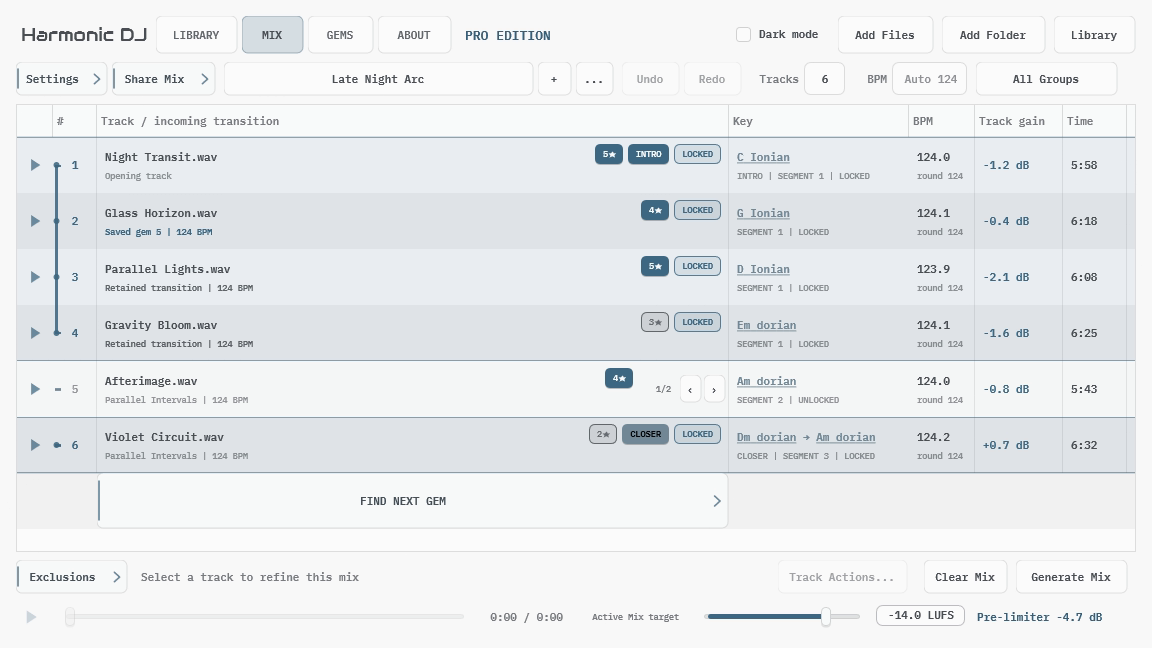
A Mix combines a tracklist with the exact planning choices used to create it. The track order, locks, exclusions, target track count, BPM, group scope, key profile, transition profile, loudness target, and other Mix Settings travel together.
Harmonic DJ ranks complete routes by improving the weakest accepted transition first. This keeps several strong transitions from averaging away one poor connection. Your personal track ratings then provide a bounded preference among eligible choices without weakening the Mix constraints.
Open Mix Map from any non-empty Mix to see that ordered route across circle-of-fifths roots and all six supported modes.
4.1. Mix Documents
Mixes are named, auto-saved documents in both Community and Pro. Use the Mix browser to search and switch documents, + to start a blank Mix, and the … menu to duplicate, rename, delete, import, or export.
New Mix starts with an empty tracklist and the default selected in Mix Settings Presets. Factory Settings is the initial default. Duplicate Mix preserves the complete current document. Switching Mixes restores each document’s own tracklist and strategy.
Undo and redo store complete, user-named document revisions. They remain available after a clean relaunch, and a new change after undo replaces the redo branch in the usual way.
Community can create and manage any number of Mix documents. A Mix containing more than five tracks stays readable and auditionable in Community, but it is read-only until Pro becomes active again. You can still create or open another Mix with five or fewer tracks.
4.2. Building a Tracklist
Choose the candidate pool with Source, set Tracks to the exact number of positions you want, choose a Mix BPM or leave it on Auto, then choose Generate Tracklist. Community accepts one through five tracks; Pro accepts larger counts too.
Two workflows help narrow the candidates:
- Reusable Library groups: In Library, use Library → Manage Groups to create a group. Select the tracks you want and choose Move to Group. Return to Mix, click Source, and choose that group or a combination of groups. All Groups includes grouped and ungrouped Library tracks. See Library Groups for group management.
- Imported playlist: Export your candidates as an M3U or M3U8 from DJ software, then choose Mix → … → Import Playlist. This creates a new Mix in playlist order, with unlocked tracks and Source set to Imported Playlist. Wait for new audio to finish analysis, adjust Tracks if needed, and generate. Removing a row keeps that track in the candidate pool. See Playlist Exchange for import and export details.
Library search, group, and readiness filters only affect browsing. Generation and alternative-track choices use the Mix’s Source, plus explicitly locked tracks, and still apply the usual BPM, key, and exclusion rules. Each Mix saves its source independently; applying a Mix Settings preset keeps it. For an imported Mix, click Source to switch between Imported Playlist and Library Groups without losing the imported pool.
Auto BPM follows the marked intro track, falls back to the first track, or lets the first generated track establish the target for an empty Mix. A typed value fixes the Mix target between 40 and 300 BPM. All Same Mix BPM modes round that target for planning and display while retaining the entered value. Ignore BPM bypasses the target and both BPM allowances.
You can also build manually. Select ready tracks in Library and use Add After when a Mix track is selected, or Add to Tracklist otherwise. Library add, insert, and replace actions lock the chosen tracks so generation keeps them. Use Unlock Track or Unlock Selected Tracks in the Mix track menu to allow replacement. Manually extending a tracklist beyond the current target automatically raises the target so authored positions are not discarded. You can also drag local track rows out to a DAW.
Mark one track as the intro or closer when that role matters. Those roles constrain the corresponding position during later generation without turning musical duration into a route-length estimate.
4.3. Refining a Tracklist
Select or right-click Mix rows to refine a result:
- Lock Track or Lock Selected Tracks keeps your chosen tracks and their order within each locked sequence. Full generation may move the sequence; tracks marked as Intro or Closer stay pinned to the beginning or end.
- Unlock Track or Unlock Selected Tracks allows generation to replace those tracks. Unlocking also clears any Intro or Closer role on them.
- Replace with Another Track steps through compatible alternatives for one position.
- Regenerate This Segment searches the unlocked region around the selected position while keeping its locked boundaries.
- Remove Without Excluding removes a track but allows it to return later.
- Exclude from This Position, This Segment, or Entire Mix records where the track should not return.
- Exclusions reviews and removes those rules without changing the current tracklist.
Explicitly locked tracks remain authored choices even if a later settings change would not select them automatically. New generated positions still have to satisfy the current constraints.
Same-key alternatives put higher-rated tracks first. A compact star badge in the tracklist shows the current personal rating without turning it into Mix document state.
Each incoming transition keeps the explanation and settings context captured when that exact directed pair was authored. Changing the transition profile, key profile, key-matching scope, or BPM strategy therefore does not relabel earlier work. Hover a Mix row to review its origin and original context; if the current settings evaluate it differently, that comparison remains secondary tooltip detail. Replacing either endpoint creates a new edge, while moving an intact locked sequence keeps its existing explanations.
Open Mix Map after refining a route to inspect its complete harmonic trajectory without changing the tracklist.
Clear Tracklist removes the current tracklist, locks, and exclusions. It keeps the Mix name, target track count, planning settings, and audio Library.
4.4. Mix Map
Choose Mix Map from the Mix toolbar to open a read-only view of the current track order. It is available in Community and Pro whenever the current Mix is non-empty. Selecting anything in the map changes only the highlighted track and route; it never reorders tracks or changes Mix settings.
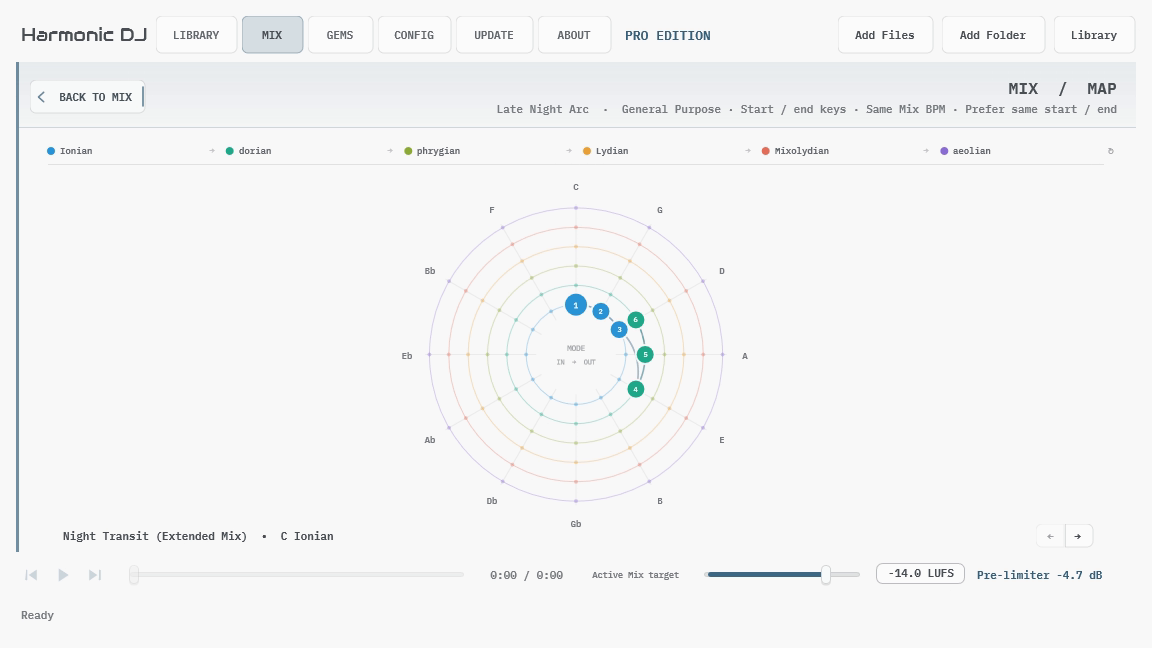
Read the map from angle, radius, and route:
- Angle shows the root. Roots advance clockwise around the circle of fifths, with C at the top.
- Radius shows the mode. The six lanes progress outward through Ionian, dorian, phrygian, Lydian, Mixolydian, and aeolian, then wrap from aeolian back to Ionian.
- Numbered nodes show tracks. Each number marks that track’s incoming or start key. The selected track is drawn larger and its title and key appear along the bottom of the page.
- Solid routes show transitions. A solid segment connects the previous track’s outgoing key to the next track’s incoming key. The selected transition is emphasized and points toward its destination.
- Dashed routes show movement within a track. When a track starts and ends in different keys, its numbered start node connects to a small outlined end marker.
Tracks that share one start key fan out around a common hub so every track number remains selectable. Choose a numbered node directly, choose the hub to cycle through that shared-key group, or use the left and right buttons beside the title to move through the complete tracklist.
The Mix Map describes the authored route; it is not a transition score. Use it to recognize steady modal progressions, parallel movement, circle-of-fifths motion, repeated keys, and deliberate returns that are harder to see in a table. Return to the Mix tracklist when you want to edit, audition, regenerate, or share the result.
4.5. Audition and Gain Guidance
Each analyzed Mix row shows a signed track-gain recommendation. This matches the track to a fixed ECMA-based reference and does not change when other tracks are added or removed. That stability makes it practical to copy the individual values into a DAW.
The Active Mix target sets the desired integrated loudness for the complete Mix. Harmonic DJ calculates one common pre-limiter gain from the gain-adjusted track average. Changing the target or tracklist changes this common value without rewriting the individual track recommendations.
Harmonic DJ applies both values during audition so playback follows the active Mix target. It does not write processed audio, add a limiter, or make transition-treatment decisions for you.
Track gain is post-planning advice. It never changes whether a route or transition is accepted.
4.6. Share Mix
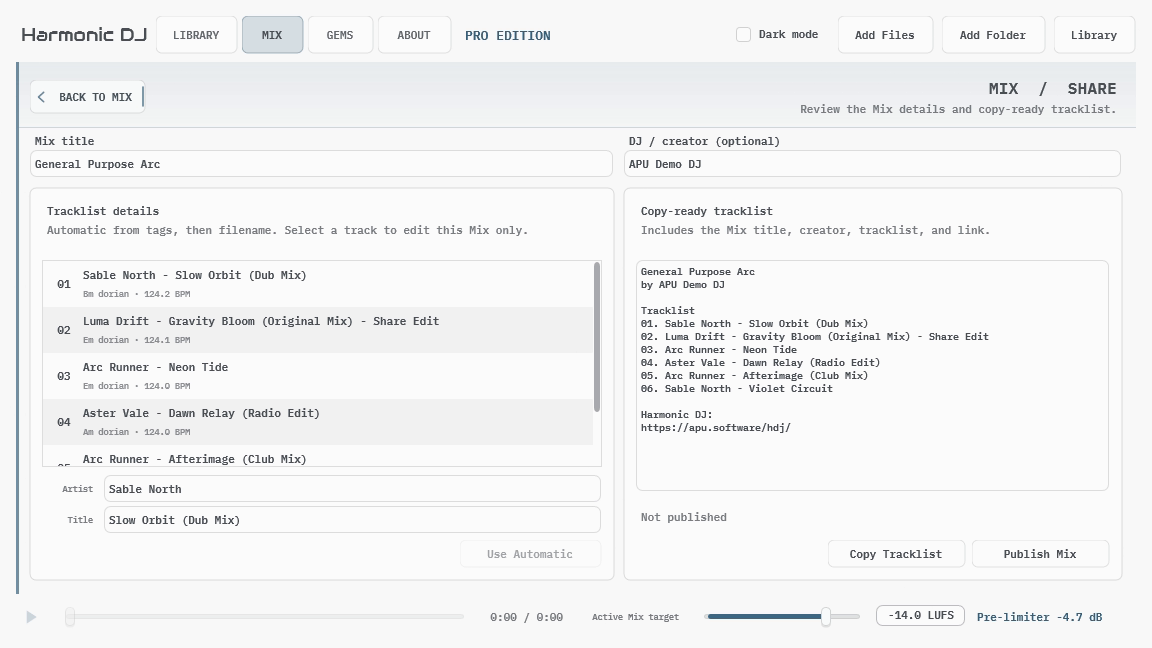
Share Mix prepares listener-facing details without changing the working tracklist. Enter a public Mix title and optional DJ or creator byline, then review the artist and title selected for each track.
Track display names start with embedded tags and fall back to conservative filename parsing. Corrections made here belong to this Mix only; they do not rewrite the audio file or global Library metadata.
Copy Tracklist copies the exact plaintext preview, including the Mix title, creator, ordered tracks, and appropriate link. Before publication the footer points to Harmonic DJ; once the current snapshot is published, it points to that Mix’s permanent page. This workflow does not upload audio.
Copied and published transition explanations come from the settings that authored each edge, not whichever profile is currently selected. A tracklist completed under several transition profiles is labeled Iterative and names them; private current-settings comparisons are not published.
5. Mix Settings
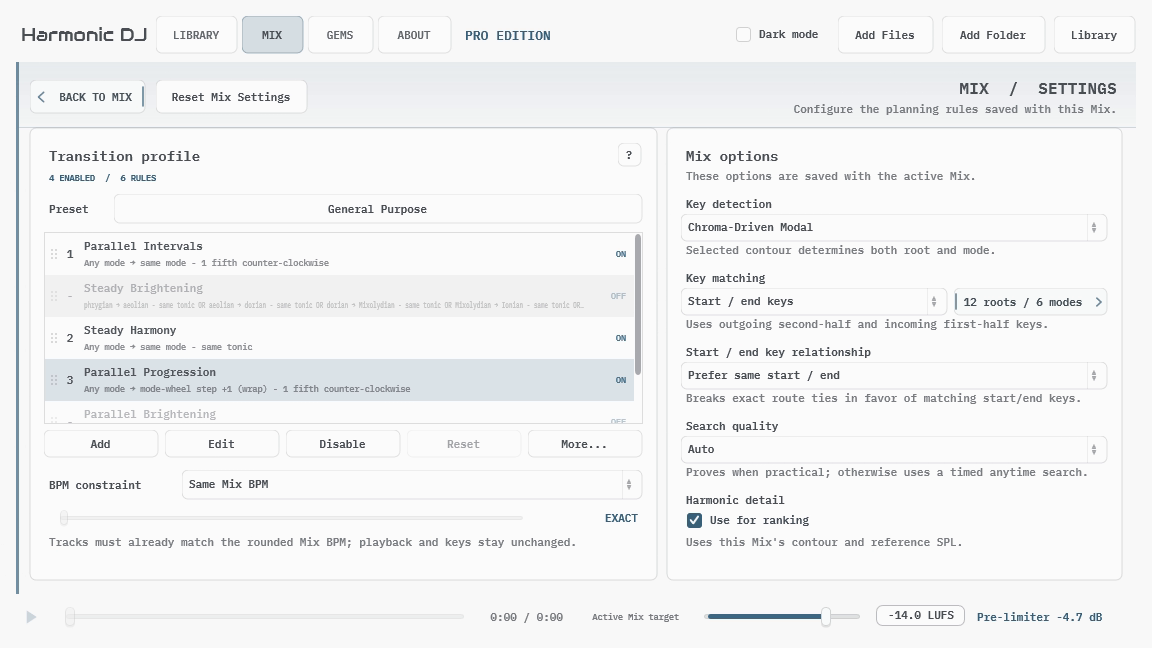
Mix Settings contains the planning rules saved with the active Mix. It is separate from the application-wide Config workspace, which controls theme and interface size. The example above uses Chroma-Driven Modal; detector choice belongs to the Mix, so another Mix can still use Benchmark-Guided Modal. Reset Mix Settings returns the whole page to the release defaults: Benchmark-Guided Modal detection, ECMA-418, the General Purpose transition preset, start/end matching, a preference for stable tracks, Same Mix BPM, Auto search quality, and harmonic-detail ranking.
Mix Settings Presets… opens the preset browser for complete planning setups. Save profiles for different situations, select one, and choose Apply Settings to copy it into the active Mix. Your candidate selection and tracklist stay with that Mix.
Change one idea at a time and listen to complete Mixes. A focused transition preset is much easier to understand when the other constraints remain steady.
5.1. Mix Settings Presets
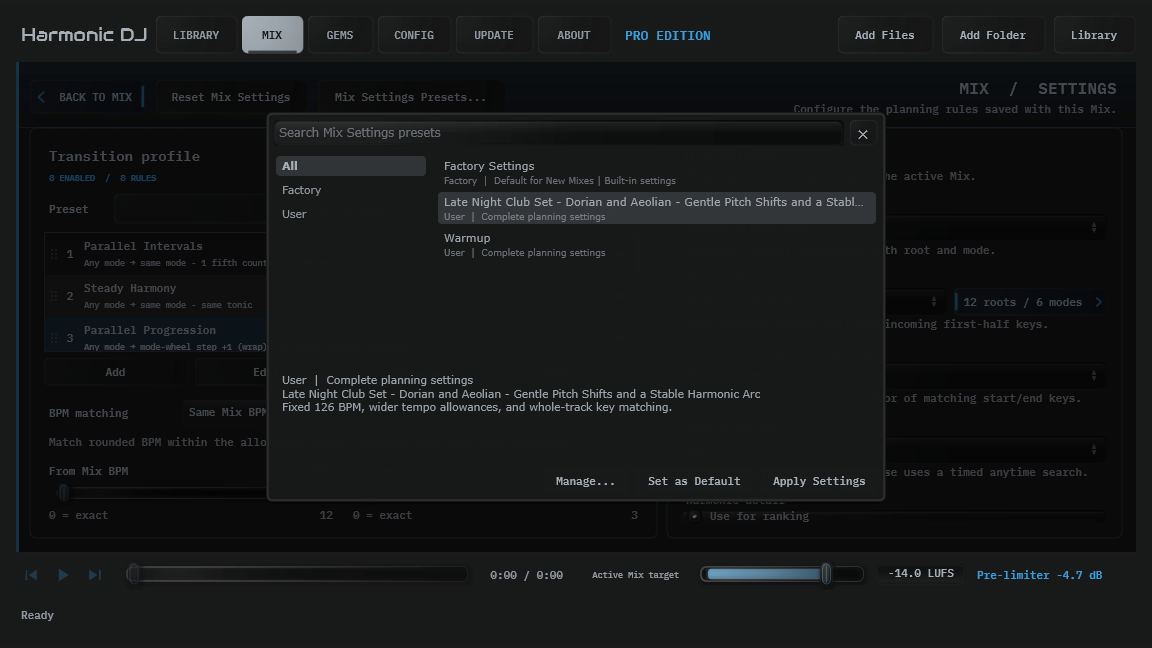
Open Mix Settings Presets… at the top of Mix Settings. This browser uses the same search and management controls as Mixes and transition presets.
Under Manage, choose Save Current Mix Settings As…, then enter a name and optional description. A complete preset includes key detection and contour/reference settings, transition rules, allowed keys, key matching and start/end relationship, BPM strategy and allowances, Auto or fixed Mix BPM, search quality, harmonic detail, and the loudness target.
Select a preset and choose Apply Settings to copy those settings into the active Mix. This creates one undo step. The Mix keeps its name, target track count, selected groups, imported-playlist selection, tracklist, locks, exclusions, and sharing details. New generation uses the applied settings; existing track placements and their authored transition explanations remain intact.
Factory Settings restores the built-in planning setup while keeping that same Mix context. A transition preset in the Transitions panel copies only the transition profile; a complete Mix Settings preset also includes the other planning controls and targets.
Choose Set as Default beside Apply Settings to use the selected profile whenever you create a blank Mix or import a playlist. The browser marks it Default for New Mixes, and the choice survives relaunch. The button is disabled when the selected profile is already the default. Selecting Factory Settings with this action restores the built-in default. Setting a default leaves the active Mix and its undo history intact; use Apply Settings to change that Mix.
New Mixes copy the selected profile’s latest saved settings. Updating the profile affects future Mixes, while deleting the default profile restores Factory Settings. The same default supplies a blank Mix when there are no saved Mixes or when you delete the final Mix. Duplicates and imported .hdjmix documents retain their own settings.
To replace a saved setup, select a user preset and choose Update Selected User Preset. Edit Selected User Preset… changes its name and description, and Delete Selected User Preset… removes it. Updating or deleting a preset leaves existing Mixes with their own copied settings. Factory Settings cannot be edited or deleted.
Preset application, saving, and updating follow the active Mix’s editing access. Community Mixes with up to five tracks can use these controls; Pro also allows larger Mixes.
5.2. Transition Profiles and Presets
A transition profile is the ordered set of enabled relation rules used to accept directed harmonic edges. The first enabled rule that matches a transition supplies its priority and primary explanation.
General Purpose enables eight default rules in priority order: Parallel Intervals, Steady Harmony, Parallel Progression, Steady Progression, Parallel Brightening, Steady Brightening, Parallel Darkening, and Steady Darkening. The first four remain the core relationships, the two non-wrapping Brightening rules are lower-priority fallbacks, and the two reverse-direction Darkening rules are the final fallbacks for constrained libraries. The factory catalog also includes a focused preset for each relationship.
Four additional focused presets let you audition transitions with roots a tritone, or six semitones, apart:
- Tritone Intervals keeps the exact detected mode.
- Tritone Progression advances through Ionian → dorian → phrygian → Lydian → Mixolydian → aeolian → Ionian, skipping unsupported locrian on the wrap.
- Tritone Brightening moves through phrygian → aeolian → dorian → Mixolydian → Ionian → Lydian without wrapping.
- Tritone Darkening follows that brightness sequence in reverse, also without wrapping.
Every factory preset retains all twelve editable rules. General Purpose leaves the four Tritone rules disabled; each focused preset enables only its same-named rule. Apply a Tritone preset to test one relationship, or enable selected Tritone rules alongside your preferred existing rules and save a user preset.
Applying a transition preset copies its complete profile into the active Mix without changing the other planning settings or targets. The Mix keeps that snapshot, so later edits or deletion of a user preset cannot silently rewrite an older Mix. Use Mix Settings Presets… for a complete planning setup.
Factory presets are immutable. Pro users can save the active profile as a user preset, then update, rename, describe, import, export, or delete that reusable entry.
5.3. Relation Rules and Rule Builder
Each relation rule describes one or more accepted source-to-destination relationships. A rule can constrain source and destination modes, source and destination tonics, or a destination tonic movement relative to the source.
Use Add for a new rule, Edit to open Rule Builder, Enable/Disable to change the selected rules, and drag rows to set priority. Reset restores General Purpose. Duplicate and delete remain under More.
Rule Builder expresses alternatives rather than a hidden script. Common relationships take one alternative, for example, the same mode with a destination root five semitones higher. More specific ideas can enumerate modes or tonics, use steps from the source mode, or combine several alternatives inside one named rule.
Saving the rule applies its complete current definition to the Mix. Canceling a changed form asks before discarding edits. At least one relation rule must remain enabled so the profile always has a usable harmonic meaning.
5.4. Key Detection and Matching
Benchmark-Guided Modal is the default detector projection and supports Ionian, dorian, phrygian, Lydian, Mixolydian, and aeolian. Benchmark Major / minor provides a conventional two-mode view. Chroma-Driven Modal retains the earlier modal projection for comparison.
Start / end keys compares the detected second half of the source track with the first half of the destination. This is the default because a transition is directional: the outgoing part of one track meets the incoming part of another.
Whole-track key combines both analyzed halves in proportion to their duration, detects one key, and uses it at both boundaries. When whole-track matching is active, the separate start/end relationship control is not used.
With start/end matching, the relationship control can require, prefer, ignore, discourage, or require a key change within each track. Preferences are soft tie-breakers after transition quality; requirements filter newly selected tracks.
5.5. Allowed Keys
Allowed Keys filters roots and modes independently across the complete Mix. Every root and every supported mode is enabled by default.
A track is eligible only when both its effective start key and effective end key use an enabled root and mode. With pitch-shifted playback, the effective keys include the same target-relative semitone shift used for audition.
These are global membership constraints, not transition rules. Locked positions, Gem Finder placements, and saved Gems cannot bypass them. At least one root and one mode must remain enabled.
5.6. BPM Matching and Allowances
Same Mix BPM compares rounded whole BPMs within the allowances below. Tracks keep their original playback speed and keys. The Mix table displays the rounded BPM, with the detected decimal available in the tooltip.
Same Mix BPM + pitch shifts also allows speed changes in the selected semitone range. Choose +/-1 semitone or +/-2 semitones directly under Pitch range; the second choice includes one-semitone changes too. Each track uses the allowed adjustment that brings its rounded effective BPM closest to the Mix target; equally close choices prefer less pitch change. Rounded playback ratios must remain within five cents of the selected semitone step. Keys shift with playback before Allowed Keys and transition matching are evaluated.
Same Mix BPM + keylock uses the same two BPM allowances as Same Mix BPM, comparing each track’s original rounded tempo before keylock. Eligible native-ratio tracks are planned for playback at the Mix BPM while preserving their original keys; half/double-time matches use the corresponding physical deck tempo shown in the tooltip. HDJ previews at the original speed and key, so you can judge harmonic flow before performing the tempo changes in your DJ software. The Mix table shows the authoritative BPM used to derive the comparison, with keylock underneath; its tooltip identifies the planned tempo.
Include half/double-time tracks is available with every Same Mix BPM strategy and is off by default. It also compares each authoritative rounded track BPM at twice and half its value, so a 61 BPM track can match a 122 BPM Mix as half-time and a 244 BPM track can match it as double-time. The selected relationship is contextual to this Mix target: Harmonic DJ does not relabel the track, rewrite its BPM, or change playback speed merely because of the ratio. With pitch shifts, only the independently selected semitone adjustment changes audition speed and key. With keylock, the tooltip shows both the physical planned tempo and its Mix-BPM equivalent.
Same Mix BPM and Same Mix BPM + keylock both apply the sliders to original rounded BPM after any enabled target-relative normalization. Same Mix BPM + pitch shifts applies them after normalization and the selected pitch shift: a 120 BPM track shifted to 127 BPM and an unshifted 127 BPM track have zero effective BPM difference. In keylock mode, those tracks retain their original 7 BPM gap for selection, so a Between tracks allowance of 3 rejects the pair even when both could eventually play at the Mix BPM.
From Mix BPM allows each track to sit above or below the Mix target by up to 12 BPM. Between tracks allows consecutive tracks to differ by up to 3 BPM. For example, at Mix BPM 128, an overall allowance of 4 admits effective tempos from 124 through 132, while a between-track allowance of 2 requires smaller steps through that range.
The sliders are linear and move in whole BPM steps. Both start at 0, meaning an exact rounded match. Values stay in fixed positions with no decimal places. A drag creates one undoable change; double-clicking restores zero.
Ignore BPM leaves playback unchanged and matches keys without requiring detected BPM. The half/double-time toggle and both allowances are hidden and ignored in this mode; their saved values return when any Same Mix BPM mode is selected. The two Pitch range choices appear only in pitch-shift mode. Switching modes retains the selected half/double-time choice, pitch range, and both BPM allowances. Reset Mix Settings turns the ratio option off, and older Mix documents without the field load with it off.
Allowances include their boundaries and apply to generation, same-key replacements, and Gem Finder. Locks and saved Gems cannot bypass them during planning. Changing allowances keeps authored rows and their original transition explanations, while incompatible rows show BPM limit with details in their tooltips. Allowances, reset, undo, and redo are saved with the Mix.
For keylocked performance, enable keylock in your DJ software. An exported M3U playlist carries track order and audio paths; it does not set deck keylock or tempo. HDJ’s keylock previews stay at the original tempo, while pitch-shift previews change speed and pitch together.
5.7. Search Quality and Harmonic Detail
Auto quickly supplies a good complete route, proves the best route when the remaining search is manageable, and otherwise continues as a bounded anytime search. The result reports whether it was proven optimal or was the best route found within that budget.
Optimal uses the same ordering and pruning but continues until the best route is proven or you cancel. It is most useful for a constrained Library or a final comparison where additional search time is acceptable.
Harmonic detail reranks already accepted transitions using the fuller outgoing and incoming harmonic distributions. It does not make an otherwise rejected transition legal and is not presented as a probability that two songs will mix well.
Route comparison sorts transition quality from weakest to strongest. Harmonic DJ improves the weakest transition first, then the next weakest. Personal ratings contribute only a bounded preference below transition-rule and saved-Gem rating steps; track-level preferences, analysis confidence, and preservation of the current slot resolve the remaining ties.
6. Gem Finder and Saved Gems
Automatic generation searches a broad relationship. Gem Finder starts from one outgoing track and lets us ask a much more specific musical question. Saved Gems preserve the directed answers that remain useful after listening.
6.1. Finding a Next Gem
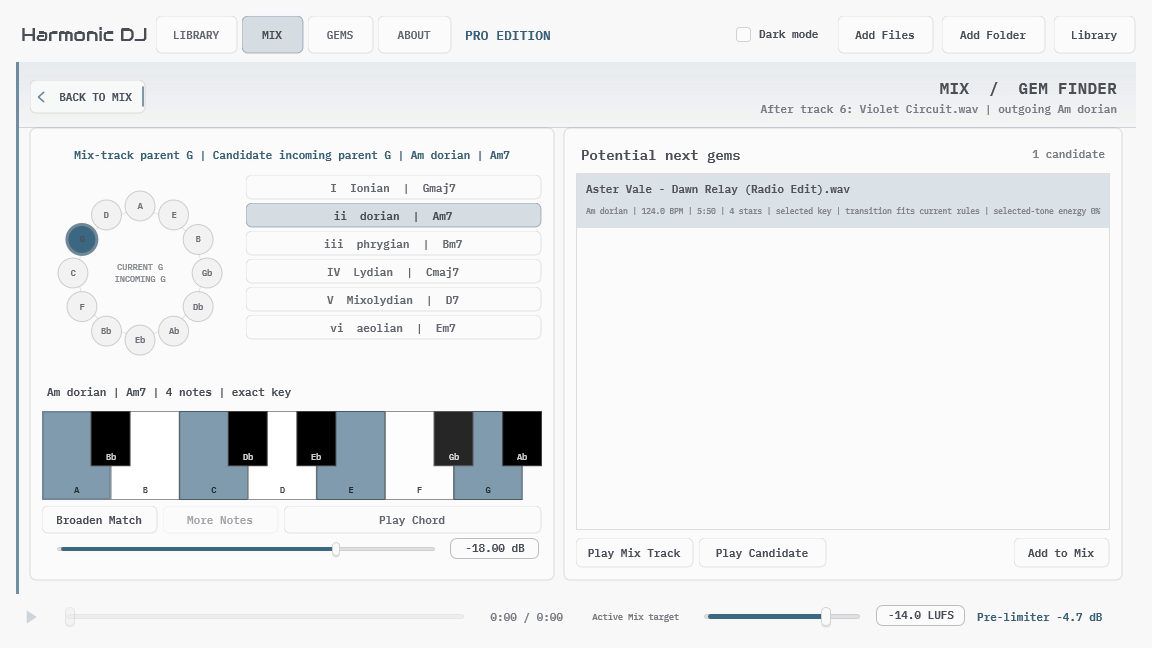
Select a Mix track and choose Find Next Gem from its context menu. The same action appears after the final track, where it naturally means “find something that could follow this.” Gem Finder requires Pro and a usable outgoing key for the selected track.
The circle of fifths marks the Mix track’s outgoing parent key separately from the incoming parent key you are exploring. Choose an incoming parent key and one of the six supported modes to define an exact modal key. The piano shows the tonic seventh chord associated with that selection.
Play Chord sustains those pitches while you alternate between the Mix track and candidate tracks. The chord is a harmonic probe: it helps teach the selected color without pretending that Harmonic DJ knows the correct cue point, phrase alignment, or transition treatment.
6.2. Candidate Selection and Placement
The first query requires the exact selected root and mode. Fewer broadens the search to same-root analyzed modes that contain the complete chord, then removes one non-root chord tone at a time. More reverses those steps and eventually restores exact root-and-mode matching.
Potential Gems include unused Library tracks that satisfy the active Mix BPM rule, Allowed Keys, matching scope, and start/end relationship requirement. Mix groups and exclusions do not hide Gem Finder candidates; this keeps the ear-led search broader than automatic generation.
Exact selected-key realizations rank first. Within otherwise-close results, higher personal ratings surface earlier and each rated row shows its star count. For relaxed results, selecting a candidate updates the displayed incoming mode while keeping the chord root and currently required pitches intact.
Place the candidate after the source track, or replace the existing next track. Placement locks both the source and candidate so generation keeps the directed pair together, and records its local harmonic approval for that Mix. It does not save a Gem, approve the reverse direction, or relax BPM and Allowed Keys.
To let generation replace either track, select both rows in Mix and choose Unlock Selected Tracks.
6.3. Saving and Rating Gems
After placing and auditioning a strong pair, right-click the destination Mix row and choose Save Incoming Transition as Gem. The saved direction is the preceding source track into that destination track.
A Gem explicitly authorizes that exact directed harmonic edge even when the general transition profile would reject it. BPM, Allowed Keys, uniqueness, and other non-harmonic constraints still apply. Saving source → destination never implies destination → source.
Gem ratings use the same 1-5 star language as track ratings. Click a star to set the personal rating, click the current star again to clear it, or choose Unrated from Personal Rating. A higher rating may increase preference between otherwise feasible choices, but it remains separate from detector evidence.
6.4. Browsing and Reusing Gems
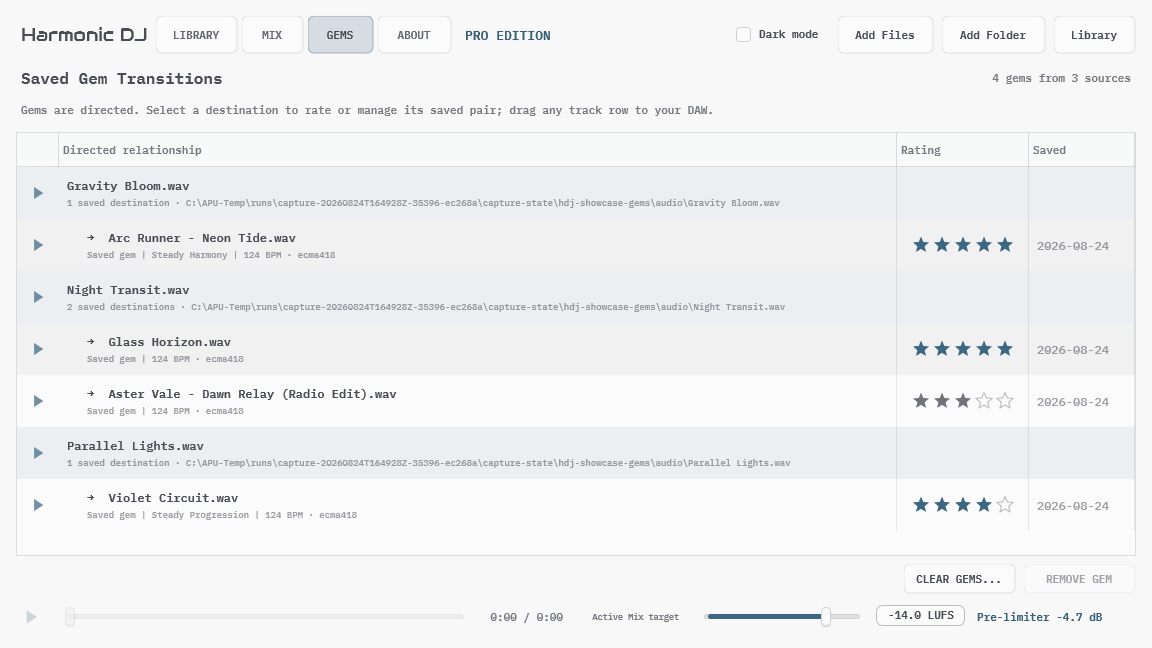
The GEMS workspace groups destinations beneath each source track. Select a destination to inspect and manage the saved directed pair.
Pro can append the pair to Mix, insert it after the selected Mix track, or replace the complete Mix tracklist with the pair. Both tracks must still be available and satisfy the active Mix BPM and Allowed Keys.
Each placement locks both tracks so generation keeps the directed pair together. To allow replacement, select both rows in Mix and choose Unlock Selected Tracks. Unlocking the Mix tracks leaves the saved Gem in your collection.
Local rows can be dragged to a DAW. Show Track in Library and Show Track in Folder reconnect the saved evidence with its audio. Removing one Gem or clearing the complete collection never deletes audio, Library tracks, or Mix tracklists.
7. Concepts and Theory
Harmonic DJ exposes enough theory to explain and shape a result, but the theory is not the result. A detected relationship can make a pairing worth hearing; rhythm, phrasing, energy, arrangement, and taste still decide whether it becomes a useful transition.
7.1. Keys, Modes, and Parent Keys
A key label combines a tonic root with a mode. Benchmark-Guided Modal currently uses Ionian, dorian, phrygian, Lydian, Mixolydian, and aeolian. The minor-family mode locrian completes the traditional seven-mode pattern, but it is not part of detector-dependent planning in the initial release.
Each modal key can also be viewed through its parent Ionian pitch collection. Two modal keys may share a parent collection while emphasizing different tonics, or preserve one modal tonic while moving between parent collections. This is why one Major/minor or Camelot-style label cannot describe every relationship Harmonic DJ can express.
The guide below holds the pitch collection fixed to C Major’s white keys and moves only the tonic. Start on the highlighted key, continue across the white keys, wrap at C when needed, and stop when the tonic returns an octave higher: C to C is Ionian, D to D is dorian, and so on.
The circle of fifths in Gem Finder shows parent keys because it gives us a stable way to explore pitch collections while separately choosing the destination mode and modal tonic.
7.2. Incoming and Outgoing Evidence
Harmonic DJ analyzes the first and second complete halves of each track. In the default start/end matching scope, the first half supplies incoming evidence and the second half supplies outgoing evidence.
A directed transition therefore compares the source’s outgoing key with the destination’s incoming key. Reversing the tracks asks a different question and can produce a different result.
Whole-track matching recombines both halves by analyzed duration and classifies one key. It is useful when one stable summary is preferable, while start/end matching retains more information about how a track may enter and leave.
7.3. Directed Harmonic Relationships
A relation rule accepts a directed pair of modal states. It may preserve a root or mode, move a root by an interval or circle-of-fifths step, move between specific modes, or combine several alternatives.
The General Purpose profile prioritizes four useful corners: same or +5-semitone root movement crossed with same or next-mode movement. It then accepts Parallel and Steady Brightening as lower-priority fallbacks through phrygian → aeolian → dorian → Mixolydian → Ionian → Lydian without wrapping. Parallel and Steady Darkening follow last through that sequence in reverse, giving constrained libraries another chance to form a complete Mix.
The opt-in Tritone rules use the corresponding mode relationships with a +6-semitone root move. Two tritone root moves return to the original pitch class, so Tritone Intervals alternates between two roots while keeping the mode fixed. Same-mode tritone scales share two of seven pitch classes; the actual overlapping phrases still decide whether a pairing sounds convincing. Audition each directed pairing and save successful transitions as Gems.
These names describe harmonic policy, not an automatic emotional arc. Library coverage, track arrangement, and the available graph determine what a complete Mix actually becomes.
7.4. Contours and Confidence
The key contour changes how frequency evidence contributes to detection and harmonic-detail ranking. None is calibrated-flat, ECMA-418 is the release default, and the two ISO 226 profiles vary with reference SPL.
The selected profile can change a derived key without rescanning because Harmonic DJ retains the underlying calibrated harmonic evidence. Gain analysis is separate and remains fixed so changing the key contour cannot move previously copied gain recommendations.
Key confidence is an uncalibrated separation heuristic: it describes how strongly the selected category separated from nearby alternatives inside the current model. It is useful context, not a promise of musical certainty and not a rejection threshold.
7.5. BPM, Pitch, and Gain
BPM is a Mix constraint rather than a reward. A track either satisfies the selected BPM policy or it does not. This prevents a harmonically strong but tempo-incompatible edge from slipping into a route through a weighted average.
When a local track has a Correcting BPM value, that value-not the retained detector estimate-is the source tempo for these constraints, Mix targeting, Gem Finder, and audition-rate calculations. The Library and Mix tooltips identify the correction and keep the detector result available for comparison.
Pitch-shifted playback changes speed and pitch together. Harmonic DJ transposes the track’s effective keys and harmonic evidence by the same integer-semitone step used to reach the Mix BPM.
Gain guidance is also independent from route selection. Per-track ECMA-relative gain helps neighboring tracks meet at a stable subjective level, while the common pre-limiter gain places the complete adjusted Mix near its integrated-LUFS target.
8. Sharing, Files, and Privacy
Harmonic DJ separates local user state from portable metadata. Audio stays local unless you independently move or publish it through some other service.
8.1. Shared Collections
Export Collection creates a versioned .hdjcollection file from the complete local Library, Ungrouped, or the currently selected local group. Name the collection before choosing its destination.
The file contains stable collection and track identifiers, sender-defined groups, structured identity, the BPM used for planning, key evidence and derived profiles, and loudness analysis. Detector confidence is included when that BPM is the detector result. A manual correction is exported as the used BPM without exposing the sender’s private correction record or stale detector confidence. The file excludes local paths, audio, personal ratings, Gems, Mix documents, and other private Library state.
Import Shared Collection adds that path-free snapshot as a named remote collection. Reimporting a newer export with the same collection and track identifiers updates the existing records instead of creating duplicates. Sender groups remain scoped beneath their collection.
Manage Shared Collections removes imported metadata without changing local tracks. Imported collections cannot currently be re-exported as if they were your own local collection.
8.2. Library Metadata
Export Library Metadata writes a path-based JSON snapshot intended for your own backup or transfer between compatible file layouts. Unlike a shared collection, it includes local file paths, personal ratings, manual BPM corrections, and other private Library state.
Import Library Metadata validates those paths and restores compatible records into the local database. It does not contain the audio itself, so the referenced files still need to exist at the stored locations.
Use .hdjcollection for friend-to-friend sharing. Use the Library metadata JSON when preserving your own local analysis and paths is the purpose.
8.3. Mix and Preset Files
A .hdjmix file contains the current Mix document: its track references, order, roles, locks, exclusions, target values, key profile, transition-profile snapshot, rules, authored incoming-transition explanations and context, sharing details, and other planning state. It does not contain audio, private undo history, or the live association with a published Mix page. Importing the file creates a new local Mix identity, so it cannot update or advertise the source Mix’s published page. Duplicate Mix follows the same rule.
Exported transition presets contain a reusable transition profile. Applying one copies that profile into the active Mix; the Mix does not depend on the preset file remaining available later.
Mix import and export, along with transition-preset management, are available in Community. Imported Mixes with five or fewer tracks are editable there. Larger imported Mixes remain readable and auditionable until Pro is active. Imported Mixes and presets are validated before replacing local state. Keep exports alongside normal project backups when a tracklist or custom relationship is important.
8.4. Playlist Exchange
Use playlists to bring a local track selection from DJ software into Harmonic DJ and return the finished track order. Import accepts UTF-8 .m3u and .m3u8 files, including relative paths and local file URLs. Export writes a UTF-8 .m3u containing absolute paths to the original audio. The audio must remain accessible on the importing computer; foreign Windows/macOS paths require relocation before import. Native Traktor NML is not supported.
Library → Import Playlist adds or reuses the referenced audio and uses the selected Library group. Choosing a group explicitly assigns existing imported tracks to that group too. Mix → … → Import Playlist creates a new named Mix in the playlist’s order using the default selected in Mix Settings Presets and keeps existing Library groups. Both queue analysis for new or changed audio and reuse successful analysis of unchanged files.
An imported Mix starts with unlocked tracks and retains the complete imported candidate pool when you remove or reorder rows. Source in the Mix toolbar displays Imported Playlist. Click it to switch to Library Groups, or return to the imported source later. Generation and alternative-track choices use the selected source; tracks you explicitly lock remain included. Library browsing filters do not change the Mix source. The usual BPM, key, and transition rules still apply. The source pool and selection are saved in the Mix document and its undo history. See Building a Tracklist for the candidate-selection workflows.
Mix → … → Export Playlist writes the current authored order. Library export offers either selected rows or the current filtered view, in displayed order. Exports retain authored repetitions and require every track to have an available local audio file; missing files and path-free shared collection entries block the export. Import keeps the first occurrence of each file and reports duplicates, missing files, and unsupported entries before asking whether to import the available tracks.
Playlist exchange transfers file references and order. It does not transfer cue points, beat grids, HDJ analysis, playback processing, or Mix settings. Keep a .hdjmix file when preserving HDJ planning state. Playlist import/export is available in Community. An imported playlist with more than five tracks opens as a read-only Mix until Pro is active. Playlist audio import runs in the standalone application, where the Library is managed.
In DJ software that supports M3U exchange, export a playlist, import it into HDJ, refine the Mix, then export an M3U for import into that software. Accepting M3U8 input in HDJ does not establish M3U8 support in another application.
8.5. Publishing a Mix
Community and Pro can copy or publish any editable saved Mix. Open Share to review the exact title, optional DJ / creator byline, and track display names that will be public. Corrections made here belong to this Mix only. Copy Tracklist works without publishing and uses the Harmonic DJ product link until the current snapshot has its own page.
Choose Publish Mix to create that page. The first time this installation publishes, enter an email address. Harmonic DJ sends a review link; opening it shows the pending tracklist, and Publish and view Mix performs the actual publication. Merely opening the email does not publish anything. If the Share page remains open, it notices the confirmation automatically; View Mix and Unpublish then appear as outlined secondary buttons beside the publication status.
Successful confirmation also establishes a publishing credential on this computer. Later Mixes normally publish immediately without another email. If the credential is missing or rejected, Harmonic DJ asks for email verification again.
Editing a Mix never changes its public page by itself. After the first publication, the primary action becomes Update Mix; choosing it replaces the snapshot at the same canonical URL. Harmonic DJ stores the publication association with that saved Mix, so switching Mixes or restarting the application retains its published state. If email verification is required again, the existing version stays public until the reviewed update is confirmed. The page remains public until explicitly unpublished, and the linked copy-ready tracklist contains its permanent URL. Unpublishing permanently retires that URL; publishing the same local Mix again is allowed and creates a new URL.
Published pages contain visible tracklist and strategy details only. They never contain audio, local file paths, private Mix history, Library groups, locks, exclusions, or raw analysis evidence. Anyone with a published URL can view it, and the page may be indexed like an ordinary public web page.
When every published track has supported key information, the page also shows an interactive Mix Map. Selecting a map node or its left and right buttons highlights the matching public tracklist row; pointing to, focusing, or choosing a tracklist row selects the same track in the map. This visualization uses the visible published key information and does not add private Library or analysis data.
Another Harmonic DJ user can choose Library > Import Collection from Mix Link… and paste the public URL to create a path-free shared collection from its public track information. This does not import the Mix itself, transfer publication ownership, or silently follow later updates.
8.6. Remote Tracks and Find Online
A shared track may appear as a planning candidate even when its audio is unavailable locally. Harmonic DJ keeps that state explicit instead of showing it as a missing file or silently removing it from discovery.
Choose Library > Import Collection from Mix Link… and paste a public Harmonic DJ Mix link to create a path-free shared collection from its public track information. This imports a collection, not the Mix itself. Importing the same link again explicitly refreshes that collection; Harmonic DJ does not follow later publication updates automatically. The public Mix page remains the reference for its authored order, transition explanations, and recording.
Imported Mix-link tracks use the key and BPM published with that Mix as discovery context for potential matches. This is not a substitute for analyzing the audio locally, so Harmonic DJ may report different keys after you obtain and add a track.
Find Online uses available identity metadata to open a MusicBrainz recording or search, a descriptive Beatport search, or a SoundCloud search. This is a lookup convenience rather than a purchasing, downloading, or matching service.
When you legally obtain the audio, add it through the ordinary Library workflow. The local track becomes the canonical playable record; there is no separate manual-link path that bypasses normal analysis.
8.7. Privacy
Commercial audio is not embedded in Library metadata, shared collections, Mix documents, transition presets, or published Mix pages. Harmonic DJ does not upload audio for license checks or proxy it between users.
Local Library paths remain local unless you deliberately use the path-based Library Metadata export. Shared collections are the path-free format intended for another person.
Share Mix corrections are stored with that Mix and do not rewrite source tags. Copying a tracklist places only the visible text on the clipboard. Publishing sends only the reviewed public snapshot. The email address is used to deliver verification and is not added to a newsletter or embedded in the page.
9. Community and Pro
Community and Pro use the same detector, key profiles, planner, saved Mix workflow, default ranking, and audio Library. Pro adds larger Mixes, Gem Finder, and reusable Gems.
9.1. Community
Community is free forever and does not require an account. It includes unlimited local analysis, Library search and management, personal track ratings, audition, key-profile selection, groups, local metadata, portable collection exchange, and the complete Settings surface.
It includes named, auto-saved Mix documents with exact track counts from one through five. You can create, rename, duplicate, import, export, undo, seed from Library, generate, lock positions, replace alternatives, remove tracks, apply exclusions, and regenerate.
Community can open the interactive Mix Map, manage transition presets, copy or publish editable Mixes, and drag playable local tracks from Mixes and Gems into other applications. It can also open and audition existing Pro Mixes and Gems. A Mix with more than five tracks is read-only until Pro is active again.
9.2. Pro
Pro removes the five-track Mix limit and unlocks Gem Finder plus saving, rating, and reusing directed Gems.
Visit the APU Harmonic DJ product page to see current Pro pricing or purchase Pro.
9.3. Trial and License Changes
Open About to start the standard APU Pro trial or activate a license. The trial unlocks the same local features as paid Pro and does not require a payment card.
When a trial expires or a license becomes inactive, Harmonic DJ returns to Community. The Library, Gems, shared collections, transition presets, and Mix documents remain stored. Mixes with five or fewer tracks stay editable. Larger Mixes stay readable and auditionable, and become editable again when Pro is active.
If Pro access changes during generation of a Mix longer than five tracks, Harmonic DJ leaves the existing saved Mix unchanged rather than committing a partial result. A Community-sized generation can finish normally.
10. Troubleshooting and Reference
Start with the status line at the top of Harmonic DJ. Long operations report their current phase, and most rejected actions explain the specific requirement that was not met.
10.1. Track States
Ready to mix means the local track has the analysis required for planning. Needs attention collects incomplete or failed local analysis. Select the track to inspect its status, then use Rescan after correcting the underlying file or decoder problem.
Missing files are local records whose stored path no longer exists. If a file moved, add it from the new location before cleanup; one byte-identical, unambiguous content match updates the Library and saved Mix paths automatically. Show in Folder opens the last known parent when possible, and Remove Missing Files permanently cleans up the remaining records after confirmation.
A shared track is intentionally metadata-only. It can support planning and online lookup but cannot be auditioned or dragged as a local audio file.
10.2. Generation and Candidate Problems
Mix generation targets the requested track count. If it cannot fill every position, it keeps the longest compatible route it found, preferring the stronger route when lengths tie, as long as every lock is preserved.
The requested track count stays unchanged so another Generate can retry the full target after you adjust the Library or constraints. If no compatible progress can preserve the locks, the current tracklist is left unchanged.
Common causes of a partial or unchanged result include:
- Too few ready and unique tracks in the selected groups
- A focused transition profile with too few compatible edges
- A strict BPM rule or narrow pitch-shift range
- Allowed roots or modes that exclude most of the Library
- Required stable or changing start/end keys
- Locked positions that cannot be connected
- Position, segment, or whole-Mix exclusions
Gem Finder intentionally ignores Mix groups and exclusions, but it still requires an unused track that passes BPM, Allowed Keys, key matching, and any start/end relationship requirement. A shared candidate can be planned but not auditioned until local audio is added normally.
10.3. Audio and M4A Playback
If a local track will not analyze or play, confirm that the file still exists and appears in the Add Files chooser for the current platform. Then rescan the track and read the status message.
On Windows, AAC and ALAC M4A decoding depends on Microsoft Media Foundation. Windows N and KN editions normally require the Media Feature Pack from Settings → Apps → Optional Features followed by a restart. The Harmonic DJ installer checks for the required components and offers to open that settings page.
On macOS, M4A uses Core Audio. Linux builds advertise only the formats available through their registered readers.
10.4. Cancellation and Recovery
Canceling discovery, analysis, metadata transfer, or generation is cooperative. The current unit of work may take a moment to stop cleanly.
Completed Library analysis is retained. An interrupted current track returns to the durable queue. Canceling Mix generation leaves the previous tracklist in place.
Mix documents are auto-saved and keep bounded revision history. If the current projection needs repair after an interrupted write, Harmonic DJ can recover it from the saved history manifest without placing that private history inside an exported .hdjmix file.
10.5. Glossary
Allowed Keys: Independent root and mode filters applied to both boundaries of every eligible Mix track.
Gem: A saved, directed source-to-destination transition approved by the listener.
Harmonic detail: Soft reranking evidence derived from fuller harmonic distributions after a transition is already accepted.
Incoming / outgoing key: The detected key used where a track enters or leaves under start/end matching.
Mix: A tracklist plus the complete planning and sharing state used to create and refine it.
Mix Map: A read-only trajectory of Mix roots, modes, within-track key movement, and directed transitions.
Parent key: The Ionian pitch collection associated with a modal key.
Pre-limiter gain: One common gain recommendation that places the gain-adjusted Mix near its integrated-loudness target before final limiting.
Relation rule: One named directed harmonic predicate inside a transition profile.
Shared collection: A path-free, audio-free snapshot of track identity and analysis metadata.
Transition profile: The ordered collection of enabled relation rules owned by a Mix.
11. Credits
This software was developed by APU Software, LLC and is available as a standalone application and VST3 plug-in on Windows, macOS, and Linux; as Audio Unit on macOS; and as AAX on Windows and macOS. The software libraries below are utilized for portions of the software:
- JUCE (cross-platform audio and user interface framework)
- Boost (header-only algorithms)
- r8brain (sample rate conversion)
- PFFFT (FFT library)
- TagLib (audio metadata)
- utf8cpp (Unicode support used by TagLib)
11.1. MIT License (r8brain)
Copyright (c) 2013-2023 Aleksey Vaneev

Permission is hereby granted, free of charge, to any person obtaining a copy
of this software and associated documentation files (the "Software"), to deal
in the Software without restriction, including without limitation the rights
to use, copy, modify, merge, publish, distribute, sublicense, and/or sell
copies of the Software, and to permit persons to whom the Software is
furnished to do so, subject to the following conditions:

The above copyright notice and this permission notice shall be included in all
copies or substantial portions of the Software.

THE SOFTWARE IS PROVIDED "AS IS", WITHOUT WARRANTY OF ANY KIND, EXPRESS OR
IMPLIED, INCLUDING BUT NOT LIMITED TO THE WARRANTIES OF MERCHANTABILITY,
FITNESS FOR A PARTICULAR PURPOSE AND NONINFRINGEMENT. IN NO EVENT SHALL THE
AUTHORS OR COPYRIGHT HOLDERS BE LIABLE FOR ANY CLAIM, DAMAGES OR OTHER
LIABILITY, WHETHER IN AN ACTION OF CONTRACT, TORT OR OTHERWISE, ARISING FROM,
OUT OF OR IN CONNECTION WITH THE SOFTWARE OR THE USE OR OTHER DEALINGS IN THE
SOFTWARE.
11.2. FFTPACK License (pffft)
Copyright (c) 2013  Julien Pommier ( pommier@modartt.com )
Based on original fortran 77 code from FFTPACKv4 from NETLIB,
authored by Dr Paul Swarztrauber of NCAR, in 1985.
As confirmed by the NCAR fftpack software curators, the following
FFTPACKv5 license applies to FFTPACKv4 sources. My changes are
released under the same terms.
FFTPACK license:
http://www.cisl.ucar.edu/css/software/fftpack5/ftpk.html
Copyright (c) 2004 the University Corporation for Atmospheric
Research ("UCAR"). All rights reserved. Developed by NCAR's
Computational and Information Systems Laboratory, UCAR,
www.cisl.ucar.edu.
Redistribution and use of the Software in source and binary forms,
with or without modification, is permitted provided that the
following conditions are met:
- Neither the names of NCAR's Computational and Information Systems
Laboratory, the University Corporation for Atmospheric Research,
nor the names of its sponsors or contributors may be used to
endorse or promote products derived from this Software without
specific prior written permission.
- Redistributions of source code must retain the above copyright
notices, this list of conditions, and the disclaimer below.
- Redistributions in binary form must reproduce the above copyright
notice, this list of conditions, and the disclaimer below in the
documentation and/or other materials provided with the
distribution.
THIS SOFTWARE IS PROVIDED "AS IS", WITHOUT WARRANTY OF ANY KIND,
EXPRESS OR IMPLIED, INCLUDING, BUT NOT LIMITED TO THE WARRANTIES OF
MERCHANTABILITY, FITNESS FOR A PARTICULAR PURPOSE AND
NONINFRINGEMENT. IN NO EVENT SHALL THE CONTRIBUTORS OR COPYRIGHT
HOLDERS BE LIABLE FOR ANY CLAIM, INDIRECT, INCIDENTAL, SPECIAL,
EXEMPLARY, OR CONSEQUENTIAL DAMAGES OR OTHER LIABILITY, WHETHER IN AN
ACTION OF CONTRACT, TORT OR OTHERWISE, ARISING FROM, OUT OF OR IN
CONNECTION WITH THE SOFTWARE OR THE USE OR OTHER DEALINGS WITH THE
SOFTWARE.
11.3. Mozilla Public License 1.1 (TagLib)
MOZILLA PUBLIC LICENSE
                                Version 1.1

                              ---------------

1. Definitions.

     1.0.1. "Commercial Use" means distribution or otherwise making the
     Covered Code available to a third party.

     1.1. "Contributor" means each entity that creates or contributes to
     the creation of Modifications.

     1.2. "Contributor Version" means the combination of the Original
     Code, prior Modifications used by a Contributor, and the Modifications
     made by that particular Contributor.

     1.3. "Covered Code" means the Original Code or Modifications or the
     combination of the Original Code and Modifications, in each case
     including portions thereof.

     1.4. "Electronic Distribution Mechanism" means a mechanism generally
     accepted in the software development community for the electronic
     transfer of data.

     1.5. "Executable" means Covered Code in any form other than Source
     Code.

     1.6. "Initial Developer" means the individual or entity identified
     as the Initial Developer in the Source Code notice required by Exhibit
     A.

     1.7. "Larger Work" means a work which combines Covered Code or
     portions thereof with code not governed by the terms of this License.

     1.8. "License" means this document.

     1.8.1. "Licensable" means having the right to grant, to the maximum
     extent possible, whether at the time of the initial grant or
     subsequently acquired, any and all of the rights conveyed herein.

     1.9. "Modifications" means any addition to or deletion from the
     substance or structure of either the Original Code or any previous
     Modifications. When Covered Code is released as a series of files, a
     Modification is:
          A. Any addition to or deletion from the contents of a file
          containing Original Code or previous Modifications.

          B. Any new file that contains any part of the Original Code or
          previous Modifications.

     1.10. "Original Code" means Source Code of computer software code
     which is described in the Source Code notice required by Exhibit A as
     Original Code, and which, at the time of its release under this
     License is not already Covered Code governed by this License.

     1.10.1. "Patent Claims" means any patent claim(s), now owned or
     hereafter acquired, including without limitation,  method, process,
     and apparatus claims, in any patent Licensable by grantor.

     1.11. "Source Code" means the preferred form of the Covered Code for
     making modifications to it, including all modules it contains, plus
     any associated interface definition files, scripts used to control
     compilation and installation of an Executable, or source code
     differential comparisons against either the Original Code or another
     well known, available Covered Code of the Contributor's choice. The
     Source Code can be in a compressed or archival form, provided the
     appropriate decompression or de-archiving software is widely available
     for no charge.

     1.12. "You" (or "Your")  means an individual or a legal entity
     exercising rights under, and complying with all of the terms of, this
     License or a future version of this License issued under Section 6.1.
     For legal entities, "You" includes any entity which controls, is
     controlled by, or is under common control with You. For purposes of
     this definition, "control" means (a) the power, direct or indirect,
     to cause the direction or management of such entity, whether by
     contract or otherwise, or (b) ownership of more than fifty percent
     (50%) of the outstanding shares or beneficial ownership of such
     entity.

2. Source Code License.

     2.1. The Initial Developer Grant.
     The Initial Developer hereby grants You a world-wide, royalty-free,
     non-exclusive license, subject to third party intellectual property
     claims:
          (a)  under intellectual property rights (other than patent or
          trademark) Licensable by Initial Developer to use, reproduce,
          modify, display, perform, sublicense and distribute the Original
          Code (or portions thereof) with or without Modifications, and/or
          as part of a Larger Work; and

          (b) under Patents Claims infringed by the making, using or
          selling of Original Code, to make, have made, use, practice,
          sell, and offer for sale, and/or otherwise dispose of the
          Original Code (or portions thereof).

          (c) the licenses granted in this Section 2.1(a) and (b) are
          effective on the date Initial Developer first distributes
          Original Code under the terms of this License.

          (d) Notwithstanding Section 2.1(b) above, no patent license is
          granted: 1) for code that You delete from the Original Code; 2)
          separate from the Original Code;  or 3) for infringements caused
          by: i) the modification of the Original Code or ii) the
          combination of the Original Code with other software or devices.

     2.2. Contributor Grant.
     Subject to third party intellectual property claims, each Contributor
     hereby grants You a world-wide, royalty-free, non-exclusive license

          (a)  under intellectual property rights (other than patent or
          trademark) Licensable by Contributor, to use, reproduce, modify,
          display, perform, sublicense and distribute the Modifications
          created by such Contributor (or portions thereof) either on an
          unmodified basis, with other Modifications, as Covered Code
          and/or as part of a Larger Work; and

          (b) under Patent Claims infringed by the making, using, or
          selling of  Modifications made by that Contributor either alone
          and/or in combination with its Contributor Version (or portions
          of such combination), to make, use, sell, offer for sale, have
          made, and/or otherwise dispose of: 1) Modifications made by that
          Contributor (or portions thereof); and 2) the combination of
          Modifications made by that Contributor with its Contributor
          Version (or portions of such combination).

          (c) the licenses granted in Sections 2.2(a) and 2.2(b) are
          effective on the date Contributor first makes Commercial Use of
          the Covered Code.

          (d)    Notwithstanding Section 2.2(b) above, no patent license is
          granted: 1) for any code that Contributor has deleted from the
          Contributor Version; 2)  separate from the Contributor Version;
          3)  for infringements caused by: i) third party modifications of
          Contributor Version or ii)  the combination of Modifications made
          by that Contributor with other software  (except as part of the
          Contributor Version) or other devices; or 4) under Patent Claims
          infringed by Covered Code in the absence of Modifications made by
          that Contributor.

3. Distribution Obligations.

     3.1. Application of License.
     The Modifications which You create or to which You contribute are
     governed by the terms of this License, including without limitation
     Section 2.2. The Source Code version of Covered Code may be
     distributed only under the terms of this License or a future version
     of this License released under Section 6.1, and You must include a
     copy of this License with every copy of the Source Code You
     distribute. You may not offer or impose any terms on any Source Code
     version that alters or restricts the applicable version of this
     License or the recipients' rights hereunder. However, You may include
     an additional document offering the additional rights described in
     Section 3.5.

     3.2. Availability of Source Code.
     Any Modification which You create or to which You contribute must be
     made available in Source Code form under the terms of this License
     either on the same media as an Executable version or via an accepted
     Electronic Distribution Mechanism to anyone to whom you made an
     Executable version available; and if made available via Electronic
     Distribution Mechanism, must remain available for at least twelve (12)
     months after the date it initially became available, or at least six
     (6) months after a subsequent version of that particular Modification
     has been made available to such recipients. You are responsible for
     ensuring that the Source Code version remains available even if the
     Electronic Distribution Mechanism is maintained by a third party.

     3.3. Description of Modifications.
     You must cause all Covered Code to which You contribute to contain a
     file documenting the changes You made to create that Covered Code and
     the date of any change. You must include a prominent statement that
     the Modification is derived, directly or indirectly, from Original
     Code provided by the Initial Developer and including the name of the
     Initial Developer in (a) the Source Code, and (b) in any notice in an
     Executable version or related documentation in which You describe the
     origin or ownership of the Covered Code.

     3.4. Intellectual Property Matters
          (a) Third Party Claims.
          If Contributor has knowledge that a license under a third party's
          intellectual property rights is required to exercise the rights
          granted by such Contributor under Sections 2.1 or 2.2,
          Contributor must include a text file with the Source Code
          distribution titled "LEGAL" which describes the claim and the
          party making the claim in sufficient detail that a recipient will
          know whom to contact. If Contributor obtains such knowledge after
          the Modification is made available as described in Section 3.2,
          Contributor shall promptly modify the LEGAL file in all copies
          Contributor makes available thereafter and shall take other steps
          (such as notifying appropriate mailing lists or newsgroups)
          reasonably calculated to inform those who received the Covered
          Code that new knowledge has been obtained.

          (b) Contributor APIs.
          If Contributor's Modifications include an application programming
          interface and Contributor has knowledge of patent licenses which
          are reasonably necessary to implement that API, Contributor must
          also include this information in the LEGAL file.

               (c)    Representations.
          Contributor represents that, except as disclosed pursuant to
          Section 3.4(a) above, Contributor believes that Contributor's
          Modifications are Contributor's original creation(s) and/or
          Contributor has sufficient rights to grant the rights conveyed by
          this License.

     3.5. Required Notices.
     You must duplicate the notice in Exhibit A in each file of the Source
     Code.  If it is not possible to put such notice in a particular Source
     Code file due to its structure, then You must include such notice in a
     location (such as a relevant directory) where a user would be likely
     to look for such a notice.  If You created one or more Modification(s)
     You may add your name as a Contributor to the notice described in
     Exhibit A.  You must also duplicate this License in any documentation
     for the Source Code where You describe recipients' rights or ownership
     rights relating to Covered Code.  You may choose to offer, and to
     charge a fee for, warranty, support, indemnity or liability
     obligations to one or more recipients of Covered Code. However, You
     may do so only on Your own behalf, and not on behalf of the Initial
     Developer or any Contributor. You must make it absolutely clear than
     any such warranty, support, indemnity or liability obligation is
     offered by You alone, and You hereby agree to indemnify the Initial
     Developer and every Contributor for any liability incurred by the
     Initial Developer or such Contributor as a result of warranty,
     support, indemnity or liability terms You offer.

     3.6. Distribution of Executable Versions.
     You may distribute Covered Code in Executable form only if the
     requirements of Section 3.1-3.5 have been met for that Covered Code,
     and if You include a notice stating that the Source Code version of
     the Covered Code is available under the terms of this License,
     including a description of how and where You have fulfilled the
     obligations of Section 3.2. The notice must be conspicuously included
     in any notice in an Executable version, related documentation or
     collateral in which You describe recipients' rights relating to the
     Covered Code. You may distribute the Executable version of Covered
     Code or ownership rights under a license of Your choice, which may
     contain terms different from this License, provided that You are in
     compliance with the terms of this License and that the license for the
     Executable version does not attempt to limit or alter the recipient's
     rights in the Source Code version from the rights set forth in this
     License. If You distribute the Executable version under a different
     license You must make it absolutely clear that any terms which differ
     from this License are offered by You alone, not by the Initial
     Developer or any Contributor. You hereby agree to indemnify the
     Initial Developer and every Contributor for any liability incurred by
     the Initial Developer or such Contributor as a result of any such
     terms You offer.

     3.7. Larger Works.
     You may create a Larger Work by combining Covered Code with other code
     not governed by the terms of this License and distribute the Larger
     Work as a single product. In such a case, You must make sure the
     requirements of this License are fulfilled for the Covered Code.

4. Inability to Comply Due to Statute or Regulation.

     If it is impossible for You to comply with any of the terms of this
     License with respect to some or all of the Covered Code due to
     statute, judicial order, or regulation then You must: (a) comply with
     the terms of this License to the maximum extent possible; and (b)
     describe the limitations and the code they affect. Such description
     must be included in the LEGAL file described in Section 3.4 and must
     be included with all distributions of the Source Code. Except to the
     extent prohibited by statute or regulation, such description must be
     sufficiently detailed for a recipient of ordinary skill to be able to
     understand it.

5. Application of this License.

     This License applies to code to which the Initial Developer has
     attached the notice in Exhibit A and to related Covered Code.

6. Versions of the License.

     6.1. New Versions.
     Netscape Communications Corporation ("Netscape") may publish revised
     and/or new versions of the License from time to time. Each version
     will be given a distinguishing version number.

     6.2. Effect of New Versions.
     Once Covered Code has been published under a particular version of the
     License, You may always continue to use it under the terms of that
     version. You may also choose to use such Covered Code under the terms
     of any subsequent version of the License published by Netscape. No one
     other than Netscape has the right to modify the terms applicable to
     Covered Code created under this License.

     6.3. Derivative Works.
     If You create or use a modified version of this License (which you may
     only do in order to apply it to code which is not already Covered Code
     governed by this License), You must (a) rename Your license so that
     the phrases "Mozilla", "MOZILLAPL", "MOZPL", "Netscape",
     "MPL", "NPL" or any confusingly similar phrase do not appear in your
     license (except to note that your license differs from this License)
     and (b) otherwise make it clear that Your version of the license
     contains terms which differ from the Mozilla Public License and
     Netscape Public License. (Filling in the name of the Initial
     Developer, Original Code or Contributor in the notice described in
     Exhibit A shall not of themselves be deemed to be modifications of
     this License.)

7. DISCLAIMER OF WARRANTY.

     COVERED CODE IS PROVIDED UNDER THIS LICENSE ON AN "AS IS" BASIS,
     WITHOUT WARRANTY OF ANY KIND, EITHER EXPRESSED OR IMPLIED, INCLUDING,
     WITHOUT LIMITATION, WARRANTIES THAT THE COVERED CODE IS FREE OF
     DEFECTS, MERCHANTABLE, FIT FOR A PARTICULAR PURPOSE OR NON-INFRINGING.
     THE ENTIRE RISK AS TO THE QUALITY AND PERFORMANCE OF THE COVERED CODE
     IS WITH YOU. SHOULD ANY COVERED CODE PROVE DEFECTIVE IN ANY RESPECT,
     YOU (NOT THE INITIAL DEVELOPER OR ANY OTHER CONTRIBUTOR) ASSUME THE
     COST OF ANY NECESSARY SERVICING, REPAIR OR CORRECTION. THIS DISCLAIMER
     OF WARRANTY CONSTITUTES AN ESSENTIAL PART OF THIS LICENSE. NO USE OF
     ANY COVERED CODE IS AUTHORIZED HEREUNDER EXCEPT UNDER THIS DISCLAIMER.

8. TERMINATION.

     8.1.  This License and the rights granted hereunder will terminate
     automatically if You fail to comply with terms herein and fail to cure
     such breach within 30 days of becoming aware of the breach. All
     sublicenses to the Covered Code which are properly granted shall
     survive any termination of this License. Provisions which, by their
     nature, must remain in effect beyond the termination of this License
     shall survive.

     8.2.  If You initiate litigation by asserting a patent infringement
     claim (excluding declatory judgment actions) against Initial Developer
     or a Contributor (the Initial Developer or Contributor against whom
     You file such action is referred to as "Participant")  alleging that:

     (a)  such Participant's Contributor Version directly or indirectly
     infringes any patent, then any and all rights granted by such
     Participant to You under Sections 2.1 and/or 2.2 of this License
     shall, upon 60 days notice from Participant terminate prospectively,
     unless if within 60 days after receipt of notice You either: (i)
     agree in writing to pay Participant a mutually agreeable reasonable
     royalty for Your past and future use of Modifications made by such
     Participant, or (ii) withdraw Your litigation claim with respect to
     the Contributor Version against such Participant.  If within 60 days
     of notice, a reasonable royalty and payment arrangement are not
     mutually agreed upon in writing by the parties or the litigation claim
     is not withdrawn, the rights granted by Participant to You under
     Sections 2.1 and/or 2.2 automatically terminate at the expiration of
     the 60 day notice period specified above.

     (b)  any software, hardware, or device, other than such Participant's
     Contributor Version, directly or indirectly infringes any patent, then
     any rights granted to You by such Participant under Sections 2.1(b)
     and 2.2(b) are revoked effective as of the date You first made, used,
     sold, distributed, or had made, Modifications made by that
     Participant.

     8.3.  If You assert a patent infringement claim against Participant
     alleging that such Participant's Contributor Version directly or
     indirectly infringes any patent where such claim is resolved (such as
     by license or settlement) prior to the initiation of patent
     infringement litigation, then the reasonable value of the licenses
     granted by such Participant under Sections 2.1 or 2.2 shall be taken
     into account in determining the amount or value of any payment or
     license.

     8.4.  In the event of termination under Sections 8.1 or 8.2 above,
     all end user license agreements (excluding distributors and resellers)
     which have been validly granted by You or any distributor hereunder
     prior to termination shall survive termination.

9. LIMITATION OF LIABILITY.

     UNDER NO CIRCUMSTANCES AND UNDER NO LEGAL THEORY, WHETHER TORT
     (INCLUDING NEGLIGENCE), CONTRACT, OR OTHERWISE, SHALL YOU, THE INITIAL
     DEVELOPER, ANY OTHER CONTRIBUTOR, OR ANY DISTRIBUTOR OF COVERED CODE,
     OR ANY SUPPLIER OF ANY OF SUCH PARTIES, BE LIABLE TO ANY PERSON FOR
     ANY INDIRECT, SPECIAL, INCIDENTAL, OR CONSEQUENTIAL DAMAGES OF ANY
     CHARACTER INCLUDING, WITHOUT LIMITATION, DAMAGES FOR LOSS OF GOODWILL,
     WORK STOPPAGE, COMPUTER FAILURE OR MALFUNCTION, OR ANY AND ALL OTHER
     COMMERCIAL DAMAGES OR LOSSES, EVEN IF SUCH PARTY SHALL HAVE BEEN
     INFORMED OF THE POSSIBILITY OF SUCH DAMAGES. THIS LIMITATION OF
     LIABILITY SHALL NOT APPLY TO LIABILITY FOR DEATH OR PERSONAL INJURY
     RESULTING FROM SUCH PARTY'S NEGLIGENCE TO THE EXTENT APPLICABLE LAW
     PROHIBITS SUCH LIMITATION. SOME JURISDICTIONS DO NOT ALLOW THE
     EXCLUSION OR LIMITATION OF INCIDENTAL OR CONSEQUENTIAL DAMAGES, SO
     THIS EXCLUSION AND LIMITATION MAY NOT APPLY TO YOU.

10. U.S. GOVERNMENT END USERS.

     The Covered Code is a "commercial item," as that term is defined in
     48 C.F.R. 2.101 (Oct. 1995), consisting of "commercial computer
     software" and "commercial computer software documentation," as such
     terms are used in 48 C.F.R. 12.212 (Sept. 1995). Consistent with 48
     C.F.R. 12.212 and 48 C.F.R. 227.7202-1 through 227.7202-4 (June 1995),
     all U.S. Government End Users acquire Covered Code with only those
     rights set forth herein.

11. MISCELLANEOUS.

     This License represents the complete agreement concerning subject
     matter hereof. If any provision of this License is held to be
     unenforceable, such provision shall be reformed only to the extent
     necessary to make it enforceable. This License shall be governed by
     California law provisions (except to the extent applicable law, if
     any, provides otherwise), excluding its conflict-of-law provisions.
     With respect to disputes in which at least one party is a citizen of,
     or an entity chartered or registered to do business in the United
     States of America, any litigation relating to this License shall be
     subject to the jurisdiction of the Federal Courts of the Northern
     District of California, with venue lying in Santa Clara County,
     California, with the losing party responsible for costs, including
     without limitation, court costs and reasonable attorneys' fees and
     expenses. The application of the United Nations Convention on
     Contracts for the International Sale of Goods is expressly excluded.
     Any law or regulation which provides that the language of a contract
     shall be construed against the drafter shall not apply to this
     License.

12. RESPONSIBILITY FOR CLAIMS.

     As between Initial Developer and the Contributors, each party is
     responsible for claims and damages arising, directly or indirectly,
     out of its utilization of rights under this License and You agree to
     work with Initial Developer and Contributors to distribute such
     responsibility on an equitable basis. Nothing herein is intended or
     shall be deemed to constitute any admission of liability.

13. MULTIPLE-LICENSED CODE.

     Initial Developer may designate portions of the Covered Code as
     "Multiple-Licensed".  "Multiple-Licensed" means that the Initial
     Developer permits you to utilize portions of the Covered Code under
     Your choice of the NPL or the alternative licenses, if any, specified
     by the Initial Developer in the file described in Exhibit A.

EXHIBIT A -Mozilla Public License.

     ``The contents of this file are subject to the Mozilla Public License
     Version 1.1 (the "License"); you may not use this file except in
     compliance with the License. You may obtain a copy of the License at
     http://www.mozilla.org/MPL/

     Software distributed under the License is distributed on an "AS IS"
     basis, WITHOUT WARRANTY OF ANY KIND, either express or implied. See the
     License for the specific language governing rights and limitations
     under the License.

     The Original Code is ______________________________________.

     The Initial Developer of the Original Code is ________________________.
     Portions created by ______________________ are Copyright (C) ______
     _______________________. All Rights Reserved.

     Contributor(s): ______________________________________.

     Alternatively, the contents of this file may be used under the terms
     of the _____ license (the  "[___] License"), in which case the
     provisions of [______] License are applicable instead of those
     above.  If you wish to allow use of your version of this file only
     under the terms of the [____] License and not to allow others to use
     your version of this file under the MPL, indicate your decision by
     deleting  the provisions above and replace  them with the notice and
     other provisions required by the [___] License.  If you do not delete
     the provisions above, a recipient may use your version of this file
     under either the MPL or the [___] License."

     [NOTE: The text of this Exhibit A may differ slightly from the text of
     the notices in the Source Code files of the Original Code. You should
     use the text of this Exhibit A rather than the text found in the
     Original Code Source Code for Your Modifications.]
11.4. Boost Software License 1.0 (utf8cpp)
Copyright 2006-2022 Nemanja Trifunovic
Boost Software License - Version 1.0 - August 17th, 2003

Permission is hereby granted, free of charge, to any person or organization
obtaining a copy of the software and accompanying documentation covered by
this license (the "Software") to use, reproduce, display, distribute,
execute, and transmit the Software, and to prepare derivative works of the
Software, and to permit third-parties to whom the Software is furnished to
do so, all subject to the following:

The copyright notices in the Software and this entire statement, including
the above license grant, this restriction and the following disclaimer,
must be included in all copies of the Software, in whole or in part, and
all derivative works of the Software, unless such copies or derivative
works are solely in the form of machine-executable object code generated by
a source language processor.

THE SOFTWARE IS PROVIDED "AS IS", WITHOUT WARRANTY OF ANY KIND, EXPRESS OR
IMPLIED, INCLUDING BUT NOT LIMITED TO THE WARRANTIES OF MERCHANTABILITY,
FITNESS FOR A PARTICULAR PURPOSE, TITLE AND NON-INFRINGEMENT. IN NO EVENT
SHALL THE COPYRIGHT HOLDERS OR ANYONE DISTRIBUTING THE SOFTWARE BE LIABLE
FOR ANY DAMAGES OR OTHER LIABILITY, WHETHER IN CONTRACT, TORT OR OTHERWISE,
ARISING FROM, OUT OF OR IN CONNECTION WITH THE SOFTWARE OR THE USE OR OTHER
DEALINGS IN THE SOFTWARE.