
2.1. TrueGain
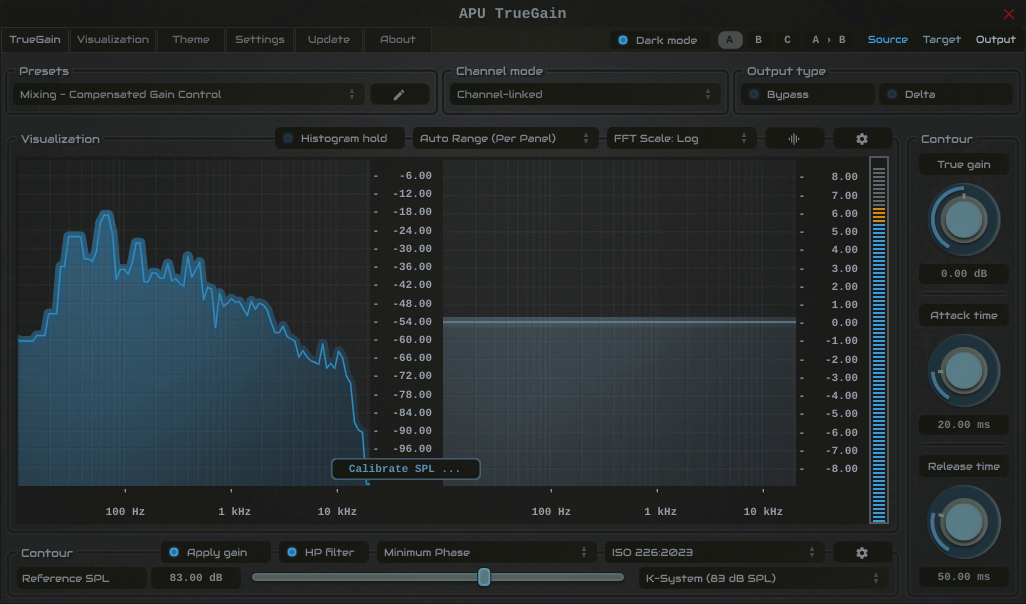
The TrueGain tab contains configuration and visualization for equal-loudness based gain compensation. This section details each of the individual parameters and components.
TrueGain also supports mini mode for a compact control-focused layout.
Calibration gives TrueGain a reference for estimating the sound pressure level at your listening position. Place TrueGain before room/headphone correction or crossfeed in your monitoring chain, and keep those processors enabled during calibration.
Calibration for Speaker Monitoring:
- Place an SPL meter at your listening position, using C-weighting and a slow response.
- Click “Calibrate SPL …”, then select Speakers: Pink Noise (Band-Limited) from calibration signal type. A 1 kHz sine wave and full-bandwidth pink noise are also available.
- Play one speaker at a time using your monitor controls. At your chosen monitoring volume, set reference SPL to the meter reading. If you are using a reference-level preset, adjust each speaker’s playback level to match it.
- Click “Stop calibration” and restore normal speaker routing. Keep your monitor volume and downstream processing at their calibrated settings.
For Bob Katz’s K-System, the K-20 reference is 83 dBC SPL per speaker, measured one speaker at a time with pink noise at -20 dBFS RMS (+3). The reference-level drop-down offers common examples; choose the level appropriate to your monitoring setup.
Calibration Signal Levels:
The built-in speaker signals are normalized to -20 dBFS on a sine-referenced RMS (+3) meter, equivalent to approximately -23.01 dBFS mathematical RMS. This RMS reference does not define a fixed LUFS value for program material.
The built-in band-limited pink noise covers 500-2500 Hz. Its stored mono K-weighted calibration measurement is approximately -22.22 LUFS. The EBU reference listening signal covers 500-2000 Hz and is normalized to -23 LUFS. Their bandwidths and normalization targets differ. Adaptive SPL uses the stored measurement for the selected calibration signal and loudness type.
Calibration for Headphone Monitoring:
- Keep your headphone volume at your chosen listening setting, with headphone correction and crossfeed enabled if you normally use them.
- Click “Calibrate SPL …”, then select Headphones: Dialog (Male) or Headphones: Dialog (Female) from calibration signal type.
- Adjust calibration offset until the spoken dialog sounds like a normal conversation from about 3 feet away in a quiet room, then click “Stop calibration”.
While headphone calibration plays, reference SPL updates automatically using Reference SPL = 65 - Calibration offset, in dB SPL. The 65 dB anchor is the plugin’s conversational reference. Dialogue matching provides a subjective estimate of listening level, not a direct measurement of headphone SPL.
Keep the selected calibration signal type after stopping playback so adaptive SPL uses the same baseline. Calibration anchors the contour model to your playback setup; its loudness compensation remains an estimate. Repeat calibration after changing monitor volume or downstream processing.