
3. Worked examples
See True gain mode and Adaptive SPL for the related controls.
These examples separate the contour adjustment from scalar gain, the level offset applied equally at all frequencies. EQ can change a signal’s measured LUFS, RMS, and peak level even when scalar gain is 0 dB.
Use the same SPL contour model and set Output type to Normal when comparing these settings. Stop calibration playback and allow the attack/release response to settle. The True gain limits must allow the stated adjustments. The example contour levels do not require raising your speaker or headphone volume to 83 dB SPL.
Output gain is available through your DAW’s plug-in parameter or automation list; TrueGain’s custom editor has no dedicated Output gain control. Where an example needs an output trim, you can use this parameter or a separate downstream gain stage.
A 75-to-83 contour with 0 dB scalar gain
To apply the contour difference from 75 to 83 while keeping scalar gain at 0 dB, use:
- True gain mode: Translation Check.
- Reference SPL: 75 dB SPL.
- Target SPL: 83 dB SPL.
- Output gain: 0 dB.
- Adaptive SPL: Off for this fixed example.
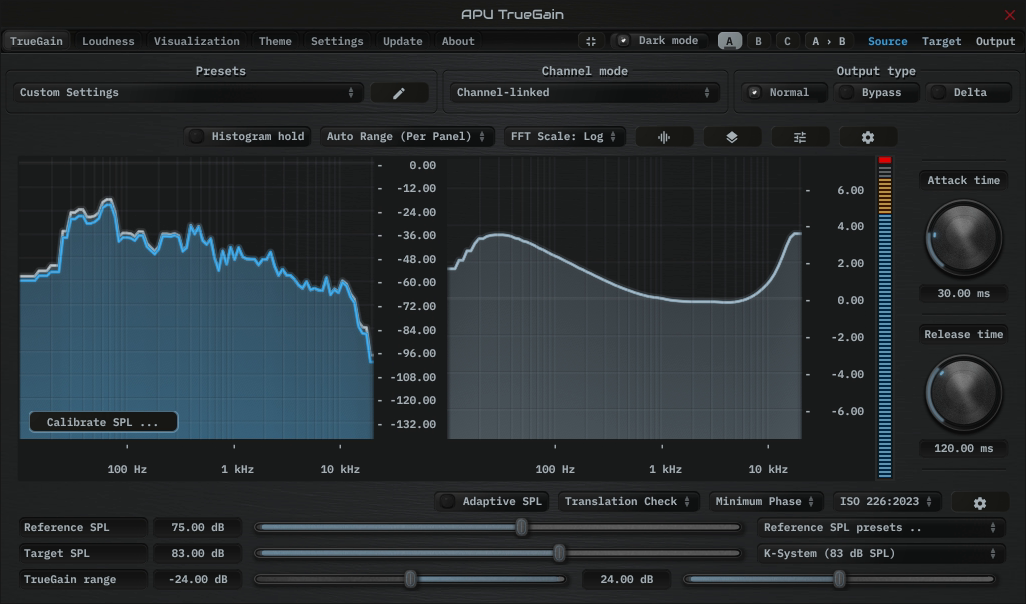
Shown with ISO 226:2023 and Minimum Phase.
An equivalent Compensated Gain Control setup uses Reference SPL = 83, True gain = -8 dB, and Output gain = +8 dB. Its contour starts at 83 + (-8) = 75 and ends at 83; its scalar gain is -8 + 8 = 0 dB.
Built-in Output gain can provide the +8 dB trim instead of a separate downstream gain stage. This equivalence assumes no additional level processing between the compared gain stages. Translation Check keeps Reference SPL at the calibrated 75 dB baseline in this example; the alternate CGC setup uses 83 as its calculation anchor.
A 65-to-83 contour with -10 dB scalar gain
For the quieter comparison, use Compensated Gain Control with Reference SPL = 83, True gain = -18 dB, Output gain = +8 dB, and Adaptive SPL off.
- Contour:
83 + (-18) = 65, through to 83. - Scalar gain:
-18 + 8 = -10 dB.
Translation Check with Reference SPL = 65, Target SPL = 83, and Output gain = -10 dB produces the same contour and scalar gain. Here 65 specifies the desired contour start; the -10 dB output trim is a separate level adjustment. These settings illustrate the filter calculation, rather than measuring your playback SPL.
When the input is 6 dB louder
Select Speakers: Pink Noise (Band-Limited), Momentary loudness, and K-weighting. Its stored calibration baseline is -22.22 LUFS. An input reading of -16.22 LUFS gives a +6 dB Reference Offset. Enable Adaptive SPL and set Reference Offset limits to allow +6 dB, such as -12 to +12 dB.
| Mode and settings | At the calibration baseline | With input +6 dB |
|---|---|---|
| CGC: Reference 83, True gain -8, Output gain +8 | Contour 75 to 83; scalar gain 0 dB | Contour 81 to 89; scalar gain 0 dB |
| Translation Check: Reference 75, Target 83, Output gain 0 | Contour 75 to 83; scalar gain 0 dB | Contour 81 to 89; scalar gain 0 dB |
| Compensated AGC: Reference 75, Target 83, Output gain 0 | Contour 75 to 83; scalar gain +8 dB | Contour 81 to 83; scalar gain +2 dB |
In CGC, Adaptive SPL updates the contour reference while True gain continues to set the gain adjustment. In Translation Check, it adds the same offset to both contour references: the Target SPL control stays at 83, but the effective target becomes 83 + 6 = 89. Neither mode automatically removes the input’s 6 dB increase.
Compensated AGC keeps its target at 83. The estimated input level rises from 75 to 81, so the required scalar gain falls from +8 to +2 dB. Attack/release smoothing controls how quickly this happens; the EQ change can also affect measured output loudness.
If the maximum Reference Offset is +3 dB, the same +6 dB input difference is capped at +3. The CGC and Translation Check examples then use contours from 78 to 86. AGC uses 78 to 83 and requests +5 dB scalar gain. Reference Offset limits and True gain limits have separate effects; a gain limit can prevent AGC from completing the requested correction.
Target SPL and a LUFS target
Target SPL is based on the selected calibration signal, input measurement, and calibrated playback level. It is not a fixed LUFS delivery target. A playback service’s normalization target also does not establish the level reaching TrueGain; use the input meter and its selected measurement window.
For a delivery requirement such as -14 LUFS integrated, measure the processed track’s integrated loudness. A Target SPL setting alone cannot guarantee that result.